# React State Management Deep Dive: Context API, Prop Drilling, React.memo, useMemo, and useCallback
# React State Management Deep Dive: Context API, Prop Drilling, React.memo, useMemo, and useCallback
> **TL;DR:** Prop drilling breaks maintainability at scale. Context API solves data sharing but triggers unnecessary re-renders if misused. React.memo, useMemo, and useCallback are surgical tools — not default medicine. This article explains when and why to reach for each one, backed by real code and honest trade-offs.
## Introduction
Every React developer hits the same wall eventually. The app starts small — a few components, clean props flowing downward, everything obvious. Then a new feature arrives. And another. The component tree grows three levels deeper overnight. Suddenly, a user's authentication status needs to reach a button buried inside a sidebar nested inside a layout nested inside a dashboard. You start passing props that nobody in the middle actually uses.
This is not a beginner problem. It's an architectural one, and it shows up in production codebases at every company that builds React applications at scale.
This article is aimed at developers who already know React fundamentals — you've built components, used `useState` and `useEffect`, and understand JSX. What you might be fuzzy on is *when* the built-in tools start to hurt, *what* React actually does during re-renders, and *how* to apply the right optimization at the right time without making your code unreadable.
We will not touch Redux, Zustand, Jotai, or any external library. Everything here is React's own toolkit.
---
## Why State Management Becomes Difficult
React's data model is intentional: data flows down via props, events bubble up via callbacks. This unidirectional flow makes components predictable and testable. But it creates real tension when:
- **Multiple unrelated components need the same data** (e.g., the navbar and the user profile page both need the logged-in user's name).
- **The component tree deepens** and intermediate components become pass-through pipes for data they never use.
- **Shared state changes** trigger broad re-renders across parts of the UI that don't need updating.
- **Teams grow**, and someone has to trace a prop through six files to understand where it originates.
These aren't theoretical concerns. They compound each other. A three-level drill is fine. A seven-level drill with twelve props is a maintenance crisis.
---
## Understanding Prop Drilling
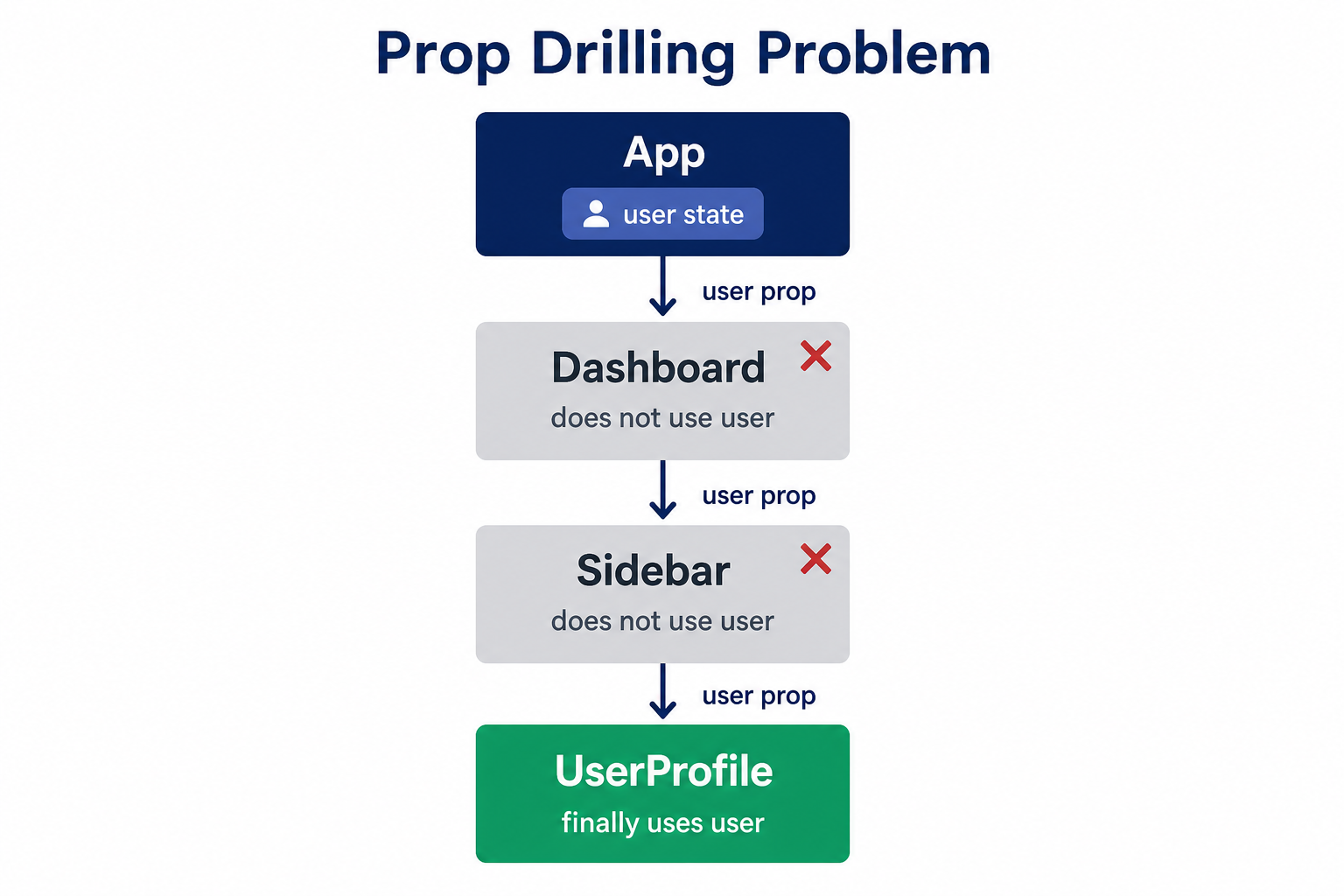
**Prop drilling** is the pattern where you pass data through component layers that don't need it, just to get it to a deeply nested child that does.
### How It Happens
Imagine a dashboard application. The root `App` fetches the authenticated user. The `Dashboard` layout doesn't care about the user, but it renders a `Sidebar`. The `Sidebar` doesn't care either, but it renders a `UserProfile` component. `UserProfile` needs the user's name and avatar.
```jsx
// App.jsx
function App() {
const [user, setUser] = React.useState({
name: 'Priya Sharma',
avatar: '/avatars/priya.png',
role: 'admin',
});
return ;
}
// Dashboard.jsx — doesn't use `user` at all
function Dashboard({ user }) {
return (
);
}
// Sidebar.jsx — also doesn't use `user`
function Sidebar({ user }) {
return (
);
}
// UserProfile.jsx — finally uses it
function UserProfile({ user }) {
return (
{user.name}{user.role}
);
}
```
`Dashboard` and `Sidebar` are pure conduits. They carry `user` only because `UserProfile` needs it. Now imagine adding ten more props across twenty components. Every refactor becomes archaeology.
### The Real Cost of Prop Drilling
- **Coupling**: Intermediate components are now tightly coupled to the shape of data they don't own.
- **Refactor brittleness**: Renaming a prop means updating every layer in the chain.
- **Readability**: New developers can't tell which props are used locally vs. passed through.
- **Testing overhead**: Integration tests must supply props to every intermediate layer.
---
## The Context API
Context API was introduced in React 16.3 to solve exactly this problem. It creates a "broadcast" channel — a Provider high in the tree that any descendant Consumer can tap into directly, skipping every intermediate layer.
### The Mental Model
Think of Context like a radio station. The Provider is the transmitter. Any component that subscribes (via `useContext`) receives the signal, regardless of how deep it sits in the tree.
```mermaid
flowchart TD
App["App (Provider)\nbroadcasts: user, theme"]
App --> Dashboard
Dashboard --> Sidebar
Dashboard --> MainContent
Sidebar --> NavLinks
Sidebar --> UserProfile["UserProfile\n✅ reads user directly"]
MainContent --> Widget
Widget --> ThemeToggle["ThemeToggle\n✅ reads theme directly"]
style App fill:#4F46E5,color:#fff
style UserProfile fill:#10B981,color:#fff
style ThemeToggle fill:#10B981,color:#fff
```
### Creating and Using Context
Let's rebuild the dashboard example with Context.
```jsx
// context/AuthContext.jsx
import React, { createContext, useContext, useState } from 'react';
const AuthContext = createContext(null);
export function AuthProvider({ children }) {
const [user, setUser] = useState({
name: 'Priya Sharma',
avatar: '/avatars/priya.png',
role: 'admin',
});
const logout = () => setUser(null);
return (
{children}
);
}
// Custom hook — always expose context through a hook, not raw useContext
export function useAuth() {
const context = useContext(AuthContext);
if (context === null) {
throw new Error('useAuth must be used inside an AuthProvider');
}
return context;
}
```
```jsx
// App.jsx
import { AuthProvider } from './context/AuthContext';
function App() {
return (
);
}
// Dashboard.jsx — clean, no user prop
function Dashboard() {
return (
);
}
// Sidebar.jsx — also clean
function Sidebar() {
return (
);
}
// UserProfile.jsx — reads directly from context
import { useAuth } from '../context/AuthContext';
function UserProfile() {
const { user, logout } = useAuth();
if (!user) return null;
return (
{user.name}{user.role}
);
}
```
`Dashboard` and `Sidebar` are now completely clean. They don't know `user` exists.
### When Context API Works Well
Context is the right tool for **low-frequency, high-reach** state:
| Use Case | Why It Fits |
|---|---|
| Authentication / session | Needed everywhere, changes rarely |
| Theme (light/dark mode) | Read by many components, set once |
| User locale/language | Global, stable across most interactions |
| Feature flags | Set at app boot, rarely change |
| User preferences | Loaded once, occasionally updated |
> **Warning:** Context is NOT a replacement for all state management. If your context value changes on every keystroke (e.g., a search input), every consumer re-renders on every change. That's a performance disaster in disguise.
---
## Understanding React Re-renders
Before reaching for any optimization hook, you need an accurate mental model of when React re-renders components.
**A component re-renders when:**
1. Its own state changes (`useState`, `useReducer`)
2. Its parent re-renders (React re-renders all children by default)
3. A context value it consumes changes
This means even components that receive identical props will re-render if their parent does. React does a shallow comparison of props only when you opt into it.
```jsx
// ParentComponent re-renders every second
function ParentComponent() {
const [tick, setTick] = React.useState(0);
React.useEffect(() => {
const id = setInterval(() => setTick(t => t + 1), 1000);
return () => clearInterval(id);
}, []);
return (
Tick: {tick}
);
}
// This re-renders every second even though `label` never changes
function ExpensiveChild({ label }) {
console.log('ExpensiveChild rendered');
return
{label}
;
}
```
In a shallow tree this is harmless. In a deep tree with expensive rendering (charts, large lists, complex calculations), this cascades into real jank.

---
## React.memo
`React.memo` is a higher-order component that wraps a function component and tells React: *"Only re-render this component if its props have actually changed."* It does a shallow comparison of the previous and next props.
```jsx
import React from 'react';
// Wrapping ExpensiveChild with React.memo
const ExpensiveChild = React.memo(function ExpensiveChild({ label }) {
console.log('ExpensiveChild rendered');
return
{label}
;
});
// Now ParentComponent can tick every second without re-rendering ExpensiveChild
// as long as `label` stays the same.
```
### When React.memo Actually Helps
React.memo is worth it when **all three** are true:
1. The component is expensive to render (complex DOM, large lists, heavy computations inside render).
2. The parent re-renders frequently for reasons unrelated to this child.
3. The props genuinely don't change between those parent re-renders.
### When React.memo Hurts
React.memo is not free. Every render does a prop comparison. For lightweight components with simple props, the comparison cost can exceed the render cost.
More insidiously: if a parent passes an **inline object or inline function** as a prop, `React.memo` is useless because those are new references on every render.
```jsx
// ❌ React.memo does nothing here — new object reference every render
// ❌ React.memo does nothing here — new function reference every render
handleClick(id)} />
```
This is where `useMemo` and `useCallback` enter.
---
## useMemo
`useMemo` memoizes the **return value** of a function. It re-computes only when its dependency array changes.
```jsx
const memoizedValue = useMemo(() => computeExpensiveValue(a, b), [a, b]);
```
### Real Use Case: Expensive Filtering
Imagine a dashboard with a table of 10,000 transactions. The user can filter by status and search by description.
```jsx
import React, { useState, useMemo } from 'react';
function TransactionDashboard({ transactions }) {
const [statusFilter, setStatusFilter] = useState('all');
const [searchQuery, setSearchQuery] = useState('');
const [sortOrder, setSortOrder] = useState('desc');
// Without useMemo: this runs on EVERY render,
// including renders caused by sortOrder changing
const filteredTransactions = useMemo(() => {
console.log('Filtering transactions...');
let result = transactions;
if (statusFilter !== 'all') {
result = result.filter(tx => tx.status === statusFilter);
}
if (searchQuery.trim()) {
const query = searchQuery.toLowerCase();
result = result.filter(tx =>
tx.description.toLowerCase().includes(query)
);
}
return result;
}, [transactions, statusFilter, searchQuery]);
// Note: sortOrder is NOT a dependency — sorting is a separate concern
const sortedTransactions = useMemo(() => {
return [...filteredTransactions].sort((a, b) =>
sortOrder === 'desc'
? b.amount - a.amount
: a.amount - b.amount
);
}, [filteredTransactions, sortOrder]);
return (
);
}
```
With 10,000 rows, the filter + sort pipeline running on every render would visibly lag. `useMemo` ensures the expensive pass only runs when the relevant inputs change.
> **Note:** `useMemo` is about computational cost, not just reference stability. If the computation is trivial (e.g., adding two numbers), `useMemo` adds overhead without benefit. Profile first.
---
## useCallback
`useCallback` memoizes a **function reference** itself. It returns the same function object between renders as long as dependencies don't change.
```jsx
const memoizedFn = useCallback(() => {
doSomething(a, b);
}, [a, b]);
```
### Why Function References Matter
In JavaScript, `() => {}` creates a new function object every time it's evaluated. When a parent re-renders, every inline callback it passes to children is a new reference — which defeats `React.memo` on those children.
```jsx
import React, { useState, useCallback, memo } from 'react';
// Memoized row component — only re-renders if its props change
const TransactionRow = memo(function TransactionRow({ transaction, onDelete }) {
console.log(`Row rendered: ${transaction.id}`);
return (
{transaction.description}
{transaction.amount}
);
});
function TransactionList({ transactions }) {
const [filter, setFilter] = useState('all');
// ✅ useCallback ensures onDelete is the same reference
// between renders unless `transactions` changes
const handleDelete = useCallback((id) => {
console.log(`Deleting transaction ${id}`);
// In a real app, dispatch an action or call an API
}, []); // No dependencies — this function doesn't close over changing state
return (
{transactions.map(tx => (
))}
);
}
```
Without `useCallback`, every time `filter` changes (causing `TransactionList` to re-render), every `TransactionRow` gets a new `onDelete` reference and re-renders — even though the delete behavior hasn't changed.
### useCallback vs useMemo
They're the same mechanism applied to different things:
| Hook | Memoizes | Returns |
|---|---|---|
| `useMemo` | The result of calling a function | A value (object, array, number, etc.) |
| `useCallback` | The function itself | A function reference |
`useCallback(fn, deps)` is exactly equivalent to `useMemo(() => fn, deps)`. The distinction is semantic clarity.
---
## Choosing the Right Strategy
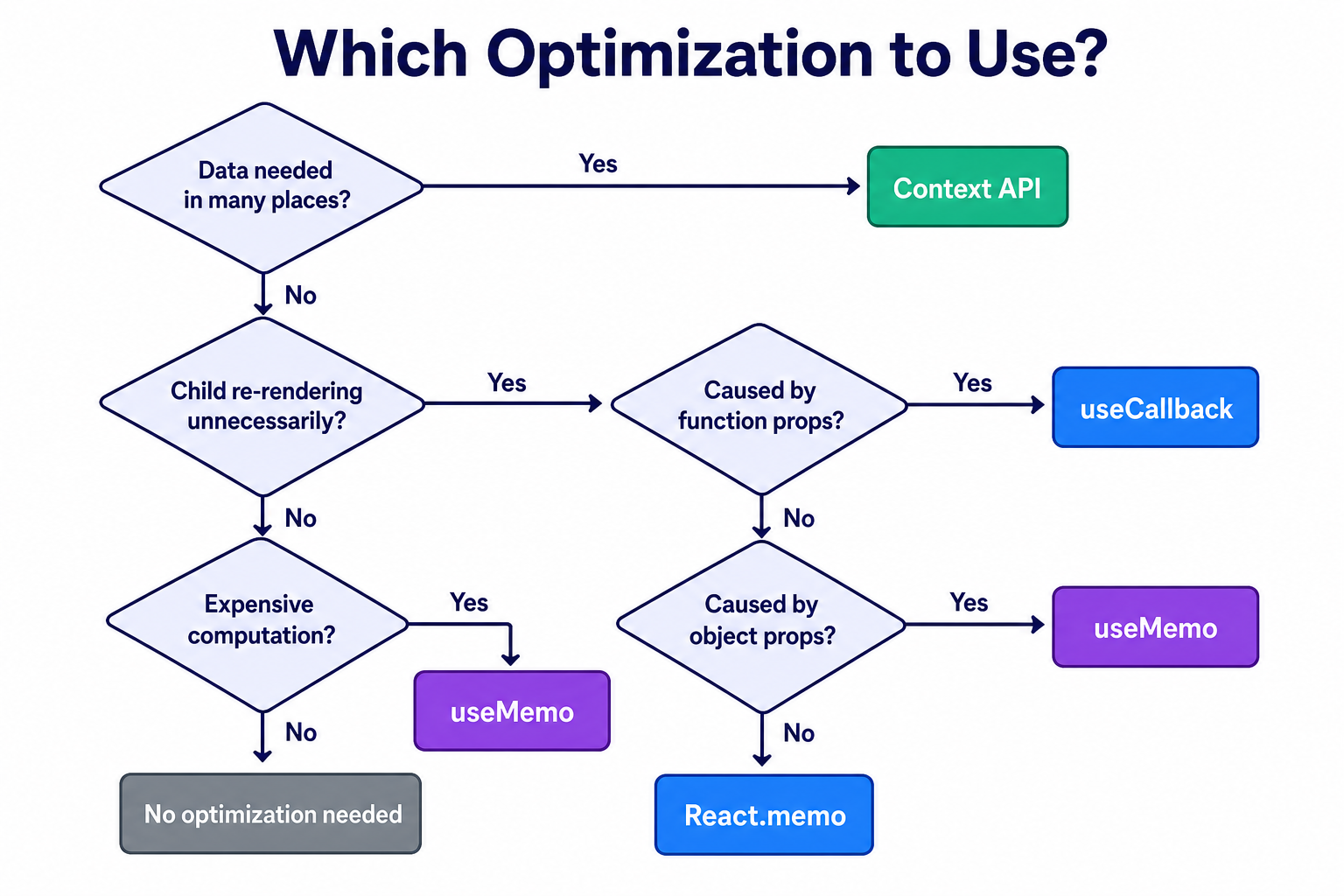
Here's the decision framework distilled:
| Problem | Solution |
|---|---|
| Data needed across many components | Context API |
| Intermediate components polluted with pass-through props | Context API |
| Child re-renders because parent re-renders | React.memo |
| Memoized child gets new function prop every render | useCallback |
| Memoized child gets new object prop every render | useMemo |
| Expensive computation runs too often | useMemo |
| None of the above | Do nothing — React is fast enough |
> **Tip:** The correct order of operations is: (1) Fix your architecture. (2) Measure. (3) Optimize. Applying `React.memo`, `useMemo`, and `useCallback` to every component by default is cargo-cult programming. It adds cognitive overhead and can actually slow down lightweight components due to comparison costs.
---
## Practical Walkthrough: A Production-Grade Theme + Auth System
Let's wire up a realistic example combining Context API, React.memo, and useCallback together.
```jsx
// context/ThemeContext.jsx
import React, { createContext, useContext, useState, useCallback } from 'react';
const ThemeContext = createContext(null);
export function ThemeProvider({ children }) {
const [theme, setTheme] = useState('light');
const toggleTheme = useCallback(() => {
setTheme(prev => (prev === 'light' ? 'dark' : 'light'));
}, []);
// IMPORTANT: Memoize the context value to prevent all consumers
// from re-rendering whenever ThemeProvider's parent re-renders
const value = React.useMemo(
() => ({ theme, toggleTheme }),
[theme, toggleTheme]
);
return (
{children}
);
}
export function useTheme() {
const context = useContext(ThemeContext);
if (!context) throw new Error('useTheme must be inside ThemeProvider');
return context;
}
```
```jsx
// components/ThemeToggle.jsx
import React from 'react';
import { useTheme } from '../context/ThemeContext';
// React.memo prevents re-render when parent re-renders for unrelated reasons
const ThemeToggle = React.memo(function ThemeToggle() {
const { theme, toggleTheme } = useTheme();
return (
);
});
export default ThemeToggle;
```
```jsx
// App.jsx — composing everything together
import React from 'react';
import { AuthProvider } from './context/AuthContext';
import { ThemeProvider } from './context/ThemeContext';
import Dashboard from './components/Dashboard';
function App() {
return (
);
}
export default App;
```
### Key patterns demonstrated here:
1. **Memoizing the context value itself** with `useMemo` prevents the "shotgun re-render" problem where every context consumer re-renders whenever the Provider's parent re-renders — even when the actual context data hasn't changed.
2. **`useCallback` on `toggleTheme`** ensures that even if `ThemeProvider` re-renders, the function reference is stable, so any `React.memo` child that receives it won't spuriously re-render.
3. **Custom hooks** (`useTheme`, `useAuth`) encapsulate the null check and provide a clear import boundary. If you later swap Context for Zustand, you change only the hook implementation, not every consumer.
---
## Trade-offs and Pitfalls
### The Context Over-fetch Problem
When a context value changes, **every** component that calls `useContext` for that context re-renders — even if the specific field they care about hasn't changed.
```jsx
// ❌ Putting everything in one context
const AppContext = createContext();
// value = { user, theme, notifications, cartItems, ... }
// A notification badge update re-renders UserProfile, ThemeToggle, CartIcon...
```
**Fix:** Split contexts by update frequency. Auth state and theme rarely change together. Cart items change constantly. Keep them separate.
### Stale Closures in useCallback
```jsx
// ❌ Bug: count is stale inside the callback
const handleClick = useCallback(() => {
console.log(count); // Always logs the initial value
}, []); // Missing `count` in deps
// ✅ Either add count as a dependency...
const handleClick = useCallback(() => {
console.log(count);
}, [count]);
// ✅ ...or use a ref for values you want to read without re-creating the function
const countRef = React.useRef(count);
useEffect(() => { countRef.current = count; });
const handleClick = useCallback(() => {
console.log(countRef.current);
}, []);
```
### Common Pitfalls Summary
| Pitfall | Symptom | Fix |
|---|---|---|
| Context value not memoized | Every consumer re-renders on parent update | Wrap value in `useMemo` |
| Inline functions passed to memo'd children | React.memo never skips renders | `useCallback` on the function |
| Inline objects passed as props | React.memo never skips renders | `useMemo` on the object |
| Missing deps in useCallback/useMemo | Stale closures, subtle bugs | Use eslint-plugin-react-hooks |
| Over-using useMemo on cheap ops | Slower code, harder to read | Profile before memoizing |
| One giant context | All consumers re-render on any update | Split contexts by concern |
---
## Best Practices
1. **Always expose context via a custom hook.** The null-check inside the hook gives you a clear error message instead of a cryptic undefined access.
2. **Memoize context values.** Any context Provider should wrap its `value` in `useMemo`. This is one of the most commonly missed optimizations.
3. **Split contexts by update frequency.** Authentication state, theme, and shopping cart should live in separate contexts.
4. **Measure before optimizing.** Use the React DevTools Profiler to identify which components are slow and why before applying `React.memo`, `useMemo`, or `useCallback`.
5. **Co-locate state as low as possible.** State that only matters to one subtree shouldn't live at the root. Lifting state too high is the root cause of most unnecessary re-renders.
6. **Treat `React.memo` as a contract.** When you wrap a component in `React.memo`, you're committing to ensuring all its props have stable references. Failing to honor that contract silently wastes memory on comparison without gaining render savings.
7. **Use the eslint-plugin-react-hooks exhaustive-deps rule.** Never disable it. Stale closures from incorrect dependency arrays are among the hardest bugs to track down.
8. **React performance problems are usually architectural.** If you find yourself adding `useMemo` everywhere, the real issue is probably that state is owned too high, or contexts are too coarse-grained.
---
## Conclusion
React gives you powerful tools for managing state and performance, but they only work well when applied with understanding, not habit.
- **Prop drilling** is the natural consequence of React's unidirectional data flow. It becomes a problem at depth — when intermediate components become pipes they shouldn't be.
- **Context API** solves the data-sharing problem cleanly for low-frequency, widely-needed state. It is not a global state store for everything.
- **Re-renders** are React's default behavior, not a bug. The question is always: is this re-render expensive enough to warrant optimization?
- **React.memo** prevents re-renders due to unchanged props, but only works if those props have stable references.
- **useMemo** stabilizes object/array references and avoids re-running expensive computations.
- **useCallback** stabilizes function references so memoized children aren't defeated by inline callbacks.
The practical takeaway: start with clean architecture. Own state at the right level. Use Context for genuinely global concerns. Only reach for memoization when you've measured a real problem. Your future teammates — and your future self — will thank you for code that's readable over code that's prematurely optimized.
---
## Further Reading
- [React docs: Passing Data Deeply with Context](https://react.dev/learn/passing-data-deeply-with-context) — the canonical source for Context API patterns and when to avoid them.
- [React docs: Referencing Values with Refs](https://react.dev/learn/referencing-values-with-refs) — useful for the stale-closure patterns mentioned in the useCallback section.
- [React DevTools Profiler](https://react.dev/blog/2018/09/10/introducing-the-react-profiler) — the right tool for measuring render performance before applying optimizations.
- [Before You memo()](https://overreacted.io/before-you-memo/) by Dan Abramov — essential reading on architectural solutions that eliminate the need for memoization entirely.
- [React docs: useMemo](https://react.dev/reference/react/useMemo) and [useCallback](https://react.dev/reference/react/useCallback) — the official API references with subtleties not covered in most tutorials.