

Modern Database Access in JavaScript: Prisma, Drizzle, and ORMs Explained
Modern Database Access in JavaScript: Prisma, Drizzle, and ORMs Explained
TL;DR: Every production application needs a reliable, maintainable way to talk to a database. This article walks through the fundamentals of SQL vs NoSQL, the pain points of raw queries, what ORMs solve, and gives you a detailed, code-driven comparison of Prisma and Drizzle — so you can make an informed choice instead of just following hype.
Introduction
The moment your application needs to remember something — a user's account, an order they placed, a product they favorited — you need a database. That decision sounds simple, but what comes next is a chain of increasingly important choices: which database engine to use, how to structure your data, how your application code talks to that database, and how you evolve the schema over time without breaking production.
Most developers learn SQL, write a few queries, feel the repetition and security anxiety creep in, and reach for an ORM (Object-Relational Mapper). In the JavaScript ecosystem, two tools dominate that conversation right now: Prisma and Drizzle. They take fundamentally different philosophies to the same problem, and picking the wrong one for your context has real long-term consequences.
This article is for backend and full-stack JavaScript/TypeScript developers who have written some SQL and maybe used a basic query builder, and are ready to understand the full picture — the concepts, the trade-offs, and the practical code.
Why Applications Need Databases
In-memory state dies when your server restarts. A file on disk doesn't scale across multiple servers. Databases exist to give applications durable, queryable, concurrent-safe storage.
The data most applications need to persist falls into predictable categories:
- Users — accounts, authentication tokens, preferences
- Orders & Payments — transactional records that must never be lost
- Products & Inventory — structured catalogs with relationships
- Events & Logs — append-heavy time-series data
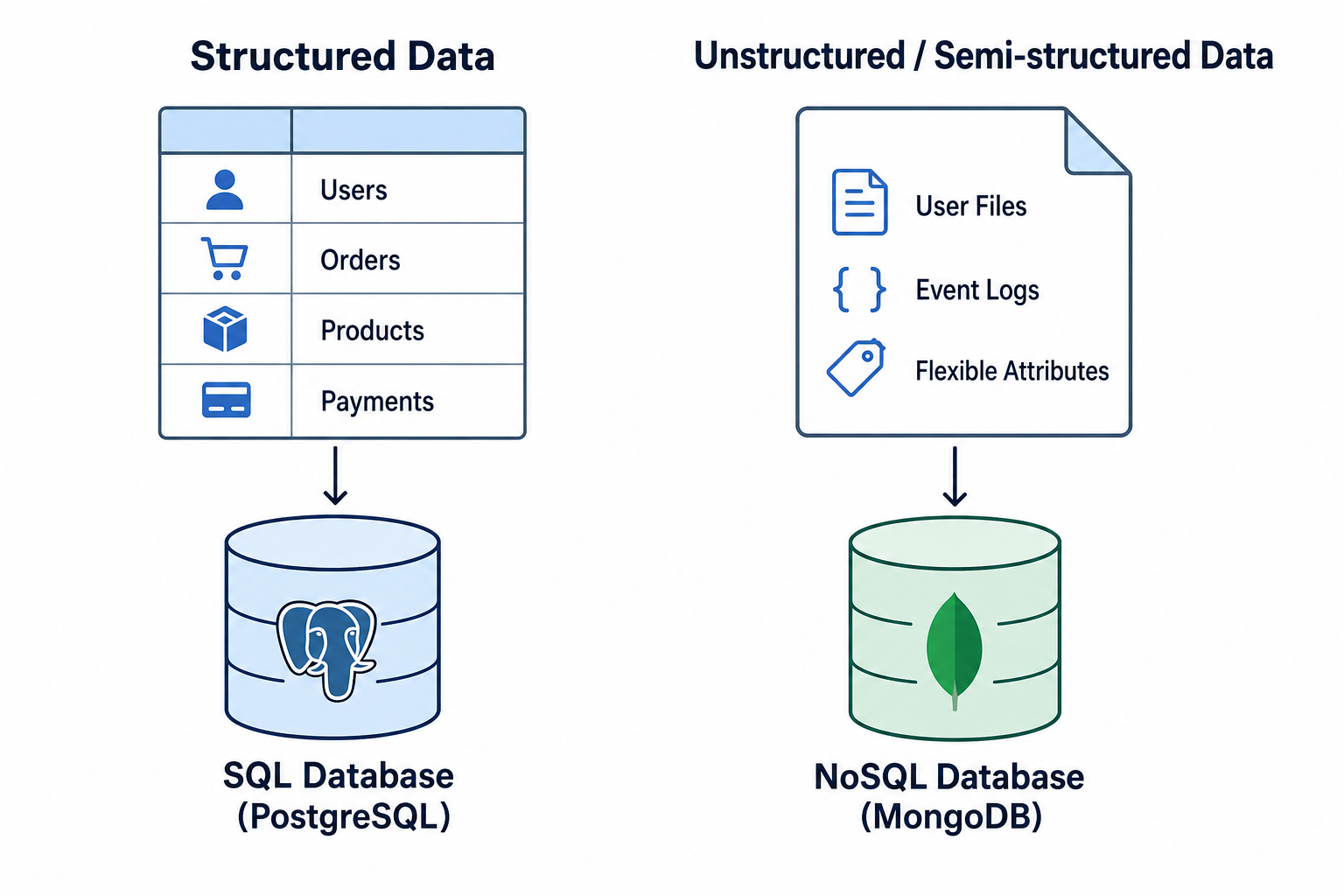
The distinction between structured and unstructured data matters here. A user's first name, email, and created-at timestamp are structured — they fit neatly into typed columns. A user's uploaded document or a JSON blob of arbitrary product attributes are semi-structured or unstructured. The database you choose should match the shape of your data.
SQL vs NoSQL Databases
SQL (relational) databases organize data into tables with fixed schemas. Rows in one table reference rows in another via foreign keys. The relational model enforces integrity at the database level. PostgreSQL, MySQL, and SQLite are the dominant choices in the JavaScript ecosystem.
NoSQL databases trade the relational model for flexibility and horizontal scalability. MongoDB stores documents (JSON-like objects) in collections. Redis stores key-value pairs in memory. Cassandra handles massive write throughput with a wide-column model.
| Dimension | SQL (Relational) | NoSQL (Document / Key-Value) |
|---|---|---|
| Schema | Fixed, enforced | Flexible, schema-optional |
| Relationships | Foreign keys, JOINs | Embedded documents or app-level |
| Consistency | ACID transactions | Eventual or tunable consistency |
| Scaling | Vertical (primarily) | Horizontal (by design) |
| Query language | SQL (standardized) | Varies by engine |
| Best for | Financial, e-commerce, CRMs | Catalogs, real-time feeds, caching |
Note: For most new SaaS or e-commerce applications, a relational database (PostgreSQL specifically) is the right default. The flexibility of NoSQL is frequently a premature optimization that adds operational complexity without benefit.
The Problem with Raw Database Queries
You can absolutely talk to PostgreSQL from Node.js using the pg package directly. For a small script, that's fine. For an application with dozens of tables and a team of engineers, it creates serious problems.
// Raw pg query — works, but watch what happens at scale
const { rows } = await pool.query(
  `SELECT u.id, u.email, o.total
   FROM users u
   JOIN orders o ON o.user_id = u.id
   WHERE u.email = \(1 AND o.status = \)2`,
  [email, 'completed']
);
The problems are not obvious from one query. They emerge from dozens of them:
1. No type safety. rows is any[]. Typos in column names, wrong return shapes — all silent at compile time.
2. SQL injection risk. Parameterized queries help, but the discipline must be maintained manually across every query in the codebase. One ${userInput} interpolated directly is a critical vulnerability.
3. Repetition. Every CRUD operation for every table is hand-written SQL. Selecting, inserting, updating, and deleting a Product requires four separate SQL strings, with field names duplicated across all of them.
4. No schema as code. The database schema lives in migration files (or worse, nowhere). New engineers have to reverse-engineer the schema by inspecting the database itself.
5. Refactoring is dangerous. Rename a column in the database, and nothing in your TypeScript code will warn you until that query runs in production.
What Is an ORM?
An Object-Relational Mapper is a library that maps database tables to classes or objects in your application code, letting you interact with the database using your programming language's constructs instead of raw SQL strings.
flowchart LR
  AppCode["Application Code\n(TypeScript)"] -->|"ORM API call"| ORM["ORM Layer\n(Prisma / Drizzle)"]
  ORM -->|"Generated SQL"| DB[("PostgreSQL / MySQL / SQLite")]
  DB -->|"Raw rows"| ORM
  ORM -->|"Typed objects"| AppCode
The ORM translates your method calls into SQL, executes them, and returns typed objects. You get:
- Type safety — your editor knows the shape of every query result
- Reusability — common patterns (pagination, filtering) are abstracted
- Security — parameterization is handled by the library
- Productivity — less boilerplate per operation
The trade-offs are real too: ORMs add a layer of abstraction that can hide performance problems, generate inefficient queries for complex cases, and have their own learning curves. The key insight is that ORMs are not a replacement for understanding SQL — they are a productivity multiplier for developers who already know SQL.
Understanding Prisma
Prisma is a schema-first ORM for Node.js and TypeScript. You define your data model in a .prisma schema file, and Prisma generates a fully typed client tailored to that schema.
The Prisma Schema
// prisma/schema.prisma

generator client {
  provider = "prisma-client-js"
}

datasource db {
  provider = "postgresql"
  url      = env("DATABASE_URL")
}

model User {
  id        Int      @id @default(autoincrement())
  email     String   @unique
  name      String?
  createdAt DateTime @default(now())
  orders    Order[]
}

model Order {
  id        Int         @id @default(autoincrement())
  total     Decimal
  status    OrderStatus @default(PENDING)
  createdAt DateTime    @default(now())
  userId    Int
  user      User        @relation(fields: [userId], references: [id])
  items     OrderItem[]
}

model Product {
  id         Int         @id @default(autoincrement())
  name       String
  price      Decimal
  stock      Int         @default(0)
  orderItems OrderItem[]
}

model OrderItem {
  id        Int     @id @default(autoincrement())
  quantity  Int
  orderId   Int
  productId Int
  order     Order   @relation(fields: [orderId], references: [id])
  product   Product @relation(fields: [productId], references: [id])
}

enum OrderStatus {
  PENDING
  COMPLETED
  CANCELLED
}
From this schema, prisma generate produces a PrismaClient with methods that are fully typed to your exact model.
Querying with Prisma
import { PrismaClient } from '@prisma/client';

const prisma = new PrismaClient();

// Fetch a user with their completed orders and order items
async function getUserOrderSummary(userId: number) {
  const user = await prisma.user.findUnique({
    where: { id: userId },
    include: {
      orders: {
        where: { status: 'COMPLETED' },
        include: {
          items: {
            include: { product: true },
          },
        },
        orderBy: { createdAt: 'desc' },
      },
    },
  });

  if (!user) throw new Error(`User ${userId} not found`);
  return user;
}

// Create a new order in a transaction
async function createOrder(
  userId: number,
  cartItems: Array<{ productId: number; quantity: number }>
) {
  return prisma.$transaction(async (tx) => {
    // Verify stock for all items first
    for (const item of cartItems) {
      const product = await tx.product.findUnique({
        where: { id: item.productId },
      });
      if (!product || product.stock < item.quantity) {
        throw new Error(`Insufficient stock for product ${item.productId}`);
      }
    }

    // Compute total
    const products = await tx.product.findMany({
      where: { id: { in: cartItems.map((i) => i.productId) } },
    });

    const total = cartItems.reduce((sum, item) => {
      const product = products.find((p) => p.id === item.productId)!;
      return sum + Number(product.price) * item.quantity;
    }, 0);

    // Create order and decrement stock atomically
    const order = await tx.order.create({
      data: {
        userId,
        total,
        items: {
          create: cartItems.map((item) => ({
            productId: item.productId,
            quantity: item.quantity,
          })),
        },
      },
    });

    for (const item of cartItems) {
      await tx.product.update({
        where: { id: item.productId },
        data: { stock: { decrement: item.quantity } },
      });
    }

    return order;
  });
}
The user variable returned by findUnique has a TypeScript type inferred from the include shape — fully autocompleted, zero runtime surprises.
Prisma Migrations
# After editing schema.prisma, generate and apply a migration
npx prisma migrate dev --name add_product_category

# Apply pending migrations in production (no prompt)
npx prisma migrate deploy

# Inspect the current database state
npx prisma studio
Prisma stores migration history in a _prisma_migrations table and generates plain SQL migration files you can review and commit to source control.
Understanding Drizzle
Drizzle takes a SQL-first philosophy. Instead of a schema DSL that generates a client, you define your schema in TypeScript using Drizzle's schema builder, which maps almost 1:1 to SQL DDL. Queries are written using a fluent, composable API that closely mirrors SQL syntax.
Defining a Schema in Drizzle
// src/db/schema.ts
import {
  pgTable,
  serial,
  varchar,
  decimal,
  integer,
  timestamp,
  pgEnum,
} from 'drizzle-orm/pg-core';

export const orderStatusEnum = pgEnum('order_status', [
  'PENDING',
  'COMPLETED',
  'CANCELLED',
]);

export const users = pgTable('users', {
  id: serial('id').primaryKey(),
  email: varchar('email', { length: 255 }).notNull().unique(),
  name: varchar('name', { length: 255 }),
  createdAt: timestamp('created_at').defaultNow().notNull(),
});

export const products = pgTable('products', {
  id: serial('id').primaryKey(),
  name: varchar('name', { length: 255 }).notNull(),
  price: decimal('price', { precision: 10, scale: 2 }).notNull(),
  stock: integer('stock').notNull().default(0),
});

export const orders = pgTable('orders', {
  id: serial('id').primaryKey(),
  userId: integer('user_id')
    .notNull()
    .references(() => users.id),
  total: decimal('total', { precision: 10, scale: 2 }).notNull(),
  status: orderStatusEnum('status').notNull().default('PENDING'),
  createdAt: timestamp('created_at').defaultNow().notNull(),
});

export const orderItems = pgTable('order_items', {
  id: serial('id').primaryKey(),
  orderId: integer('order_id')
    .notNull()
    .references(() => orders.id),
  productId: integer('product_id')
    .notNull()
    .references(() => products.id),
  quantity: integer('quantity').notNull(),
});
Querying with Drizzle
import { drizzle } from 'drizzle-orm/node-postgres';
import { eq, and, inArray } from 'drizzle-orm';
import { Pool } from 'pg';
import { users, orders, orderItems, products } from './schema';

const pool = new Pool({ connectionString: process.env.DATABASE_URL });
const db = drizzle(pool);

// Fetch completed orders for a user with a JOIN
async function getUserCompletedOrders(userId: number) {
  const result = await db
    .select({
      orderId: orders.id,
      total: orders.total,
      status: orders.status,
      createdAt: orders.createdAt,
      productName: products.name,
      quantity: orderItems.quantity,
    })
    .from(orders)
    .innerJoin(orderItems, eq(orderItems.orderId, orders.id))
    .innerJoin(products, eq(products.id, orderItems.productId))
    .where(and(eq(orders.userId, userId), eq(orders.status, 'COMPLETED')))
    .orderBy(orders.createdAt);

  return result;
}

// Create an order using a transaction
async function createOrder(
  userId: number,
  cartItems: Array<{ productId: number; quantity: number }>
) {
  return db.transaction(async (tx) => {
    const productIds = cartItems.map((i) => i.productId);
    const productRows = await tx
      .select()
      .from(products)
      .where(inArray(products.id, productIds));

    for (const item of cartItems) {
      const product = productRows.find((p) => p.id === item.productId);
      if (!product || product.stock < item.quantity) {
        throw new Error(`Insufficient stock for product ${item.productId}`);
      }
    }

    const total = cartItems.reduce((sum, item) => {
      const product = productRows.find((p) => p.id === item.productId)!;
      return sum + Number(product.price) * item.quantity;
    }, 0);

    const [order] = await tx
      .insert(orders)
      .values({ userId, total: String(total) })
      .returning();

    await tx.insert(orderItems).values(
      cartItems.map((item) => ({
        orderId: order.id,
        productId: item.productId,
        quantity: item.quantity,
      }))
    );

    for (const item of cartItems) {
      await tx
        .update(products)
        .set({ stock: sql`\({products.stock} - \){item.quantity}` })
        .where(eq(products.id, item.productId));
    }

    return order;
  });
}
Drizzle's query API reads almost like SQL. If you know SQL, you already understand most of Drizzle.
Drizzle Migrations
# Generate migration SQL from schema changes
npx drizzle-kit generate:pg

# Apply migrations
npx drizzle-kit push:pg  # for development (no migration files)
# or use drizzle-kit migrate for file-based migrations in production
Note: Drizzle Kit is the companion CLI. It can either push schema changes directly to a dev database or generate versioned SQL migration files for production workflows.
Prisma vs Drizzle: A Direct Comparison
| Dimension | Prisma | Drizzle |
|---|---|---|
| Philosophy | Schema-first, ORM | SQL-first, query builder |
| Schema definition | .prisma DSL file |
TypeScript schema file |
| Type safety | Full, via generated client | Full, via TypeScript schema |
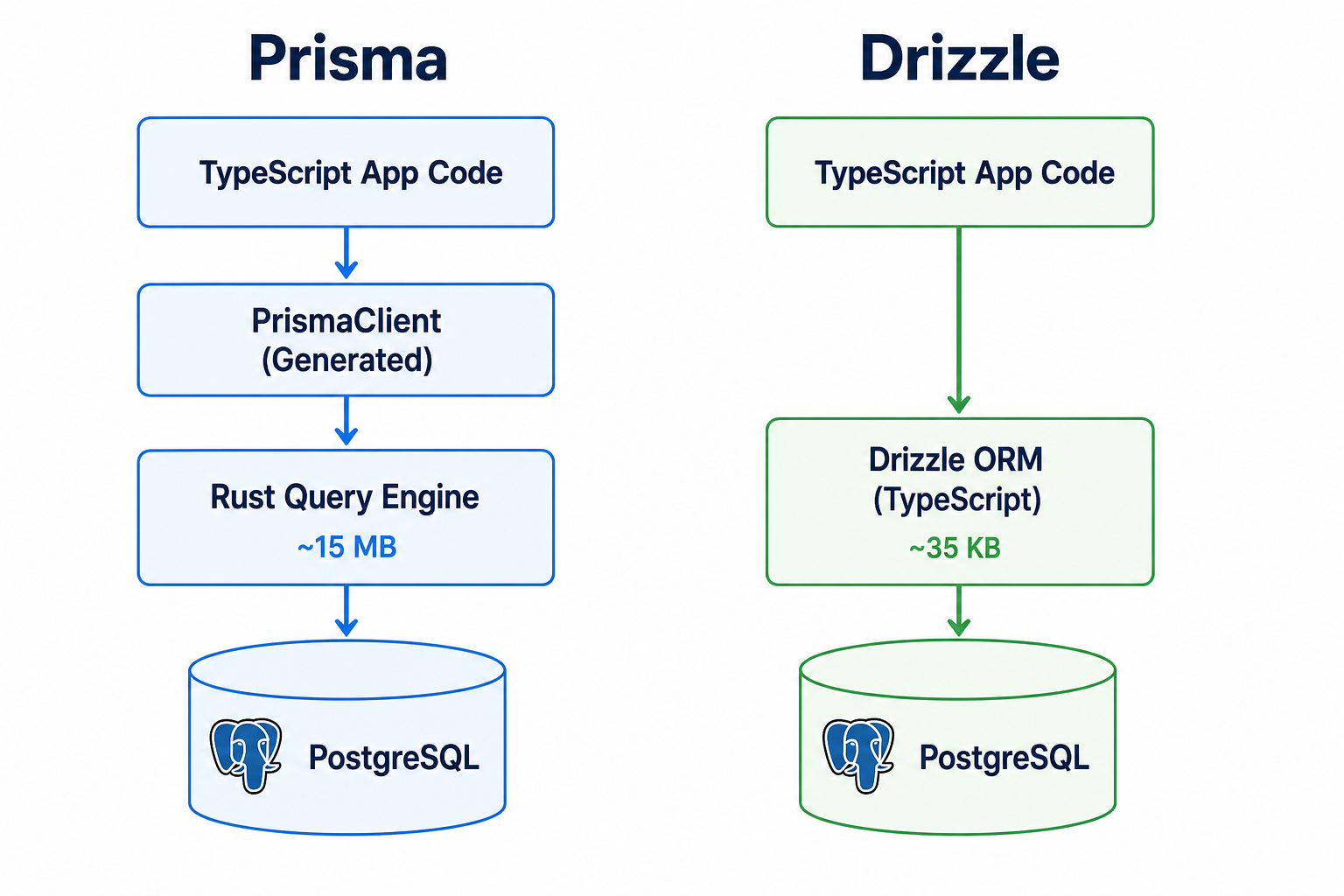
| Bundle size | Large (Rust query engine) | Very small (~35 KB) |
| Query style | Object/method chaining | SQL-like fluent API |
| N+1 protection | Built-in with include |
Manual (use JOINs) |
| Raw SQL escape hatch | prisma.$queryRaw |
sql template tag |
| Edge runtime support | Limited (Prisma Accelerate) | First-class |
| Migration tooling | Excellent (built-in) | Good (Drizzle Kit) |
| Learning curve | Gentle (higher abstraction) | Moderate (SQL knowledge helps) |
| Ecosystem maturity | Mature (launched 2019) | Growing fast (launched 2022) |
| Best for | Rapid prototyping, teams new to SQL | Performance-critical, edge deployments |
Performance note: In benchmarks, Drizzle consistently outperforms Prisma on throughput-heavy workloads because it generates leaner SQL and doesn't carry Prisma's Rust-based query engine overhead. For most applications this difference is irrelevant, but at high scale (think thousands of queries per second), it matters.
Warning: Prisma's
includefor nested relations can generate multiple round-trips to the database under the hood (the N+1 pattern is mitigated, but data fetching is not always a single JOIN). For complex reporting queries, drop down toprisma.$queryRawor switch tools.
Database Migrations in Practice
Migrations are versioned SQL scripts that describe how to move your schema from one state to another. They are essential for collaborative development and safe production deployments.
# A typical Prisma migration history
prisma/migrations/
  20240101_000000_init/
    migration.sql
  20240215_143200_add_product_category/
    migration.sql
  20240310_091500_add_user_address/
    migration.sql
Each migration file is plain SQL that you can review:
-- 20240215_143200_add_product_category/migration.sql
ALTER TABLE "Product" ADD COLUMN "categoryId" INTEGER;

CREATE TABLE "Category" (
    "id" SERIAL NOT NULL,
    "name" TEXT NOT NULL,
    CONSTRAINT "Category_pkey" PRIMARY KEY ("id")
);

ALTER TABLE "Product"
  ADD CONSTRAINT "Product_categoryId_fkey"
  FOREIGN KEY ("categoryId") REFERENCES "Category"("id")
  ON DELETE SET NULL ON UPDATE CASCADE;
Common migration challenges:
- Destructive changes — dropping a column that code still references causes instant production failures. Always deploy code that doesn't reference the old column before dropping it.
- Large table migrations — adding a
NOT NULLcolumn without a default to a table with millions of rows will lock the table. UseADD COLUMNwith a default, backfill, then add the constraint separately. - Rollbacks — Prisma does not generate rollback scripts automatically. Write them manually for high-risk migrations.
Tip: In production CI/CD pipelines, run
prisma migrate deploy(or the Drizzle equivalent) as a step before the application starts. Never run migrations in application startup code — it causes race conditions in horizontally scaled deployments.
Designing Data Models
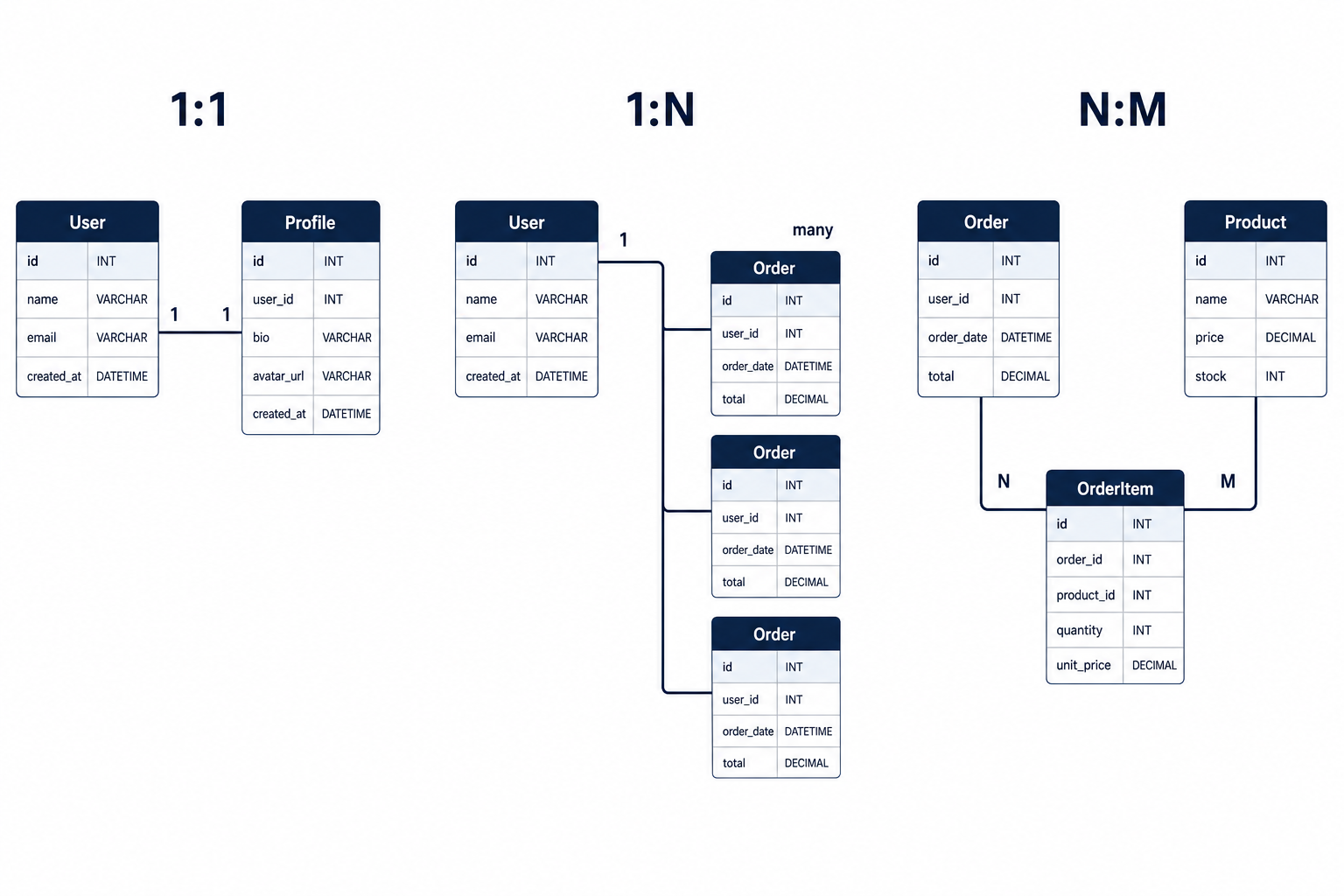
Relational databases express three kinds of relationships between entities.
One-to-One
One user has one profile. Implemented with a unique foreign key.
model User {
  id      Int      @id @default(autoincrement())
  email   String   @unique
  profile Profile?
}

model Profile {
  id     Int    @id @default(autoincrement())
  bio    String?
  userId Int    @unique
  user   User   @relation(fields: [userId], references: [id])
}
One-to-Many
One user has many orders. The most common relationship pattern.
model User {
  id     Int     @id @default(autoincrement())
  orders Order[]
}

model Order {
  id     Int  @id @default(autoincrement())
  userId Int
  user   User @relation(fields: [userId], references: [id])
}
Many-to-Many
Orders have many products, and products appear in many orders. Requires a join table (here, OrderItem).
erDiagram
  USER ||--o{ ORDER : places
  ORDER ||--|{ ORDER_ITEM : contains
  PRODUCT ||--|{ ORDER_ITEM : appears_in
  USER {
    int id PK
    string email
  }
  ORDER {
    int id PK
    int userId FK
    decimal total
    string status
  }
  ORDER_ITEM {
    int id PK
    int orderId FK
    int productId FK
    int quantity
  }
  PRODUCT {
    int id PK
    string name
    decimal price
  }
Trade-offs & Pitfalls
| Pitfall | Prisma | Drizzle |
|---|---|---|
| Generated SQL opacity | High — hard to see exactly what runs | Low — query mirrors your code |
| Bundle size in serverless | ~15 MB with engine binary | ~35 KB |
| Complex aggregations | Awkward, use $queryRaw |
Natural, use sql tag |
| Schema drift | Can happen if DB is modified manually | Same risk |
| N+1 queries | Protected by include, but watch nested loops |
Must manually use JOINs |
| Migration rollback | Manual SQL required | Manual SQL required |
Choosing the Right Tool
Choose Prisma when:
- Your team is newer to databases and benefits from the higher abstraction layer
- You want excellent developer tooling out of the box (Prisma Studio is genuinely useful)
- You're building a standard CRUD-heavy web app where Prisma's query patterns cover 95% of your needs
- Rapid development velocity matters more than raw query performance
Choose Drizzle when:
- You're deploying to edge runtimes (Cloudflare Workers, Vercel Edge) where bundle size matters
- You want fine-grained control over the SQL that runs
- Your team is comfortable with SQL and finds Prisma's abstraction more hindrance than help
- You're building a high-throughput service where query overhead is measurable
Consider neither (use raw pg or mysql2) when:
- You're writing a one-off data script
- You have extremely complex reporting queries that no ORM will generate efficiently
- You're integrating with a stored-procedure-heavy legacy database
Tip: For new projects at a startup, Prisma is usually the pragmatic default — it gets you to a working, maintainable codebase faster. For performance-critical microservices or edge functions, Drizzle's lightweight footprint is worth the trade-off.
Best Practices
Always commit migration files to source control. Migrations are part of your application's history. Treat them like code.
Never run
prisma migrate devin production. This command can prompt and reset data. Useprisma migrate deployin CI.Define indexes explicitly. Neither Prisma nor Drizzle adds indexes automatically beyond primary keys. Add
@@indexin Prisma and.index()in Drizzle for any column you filter or sort by frequently.Use transactions for multi-step writes. Any operation that modifies more than one table must be wrapped in a transaction. Both Prisma and Drizzle support this.
Log slow queries. Configure your database to log queries over 100ms. Don't rely on your ORM to tell you when something is slow.
Don't over-include in Prisma. Loading deep nested relations eagerly in every request is a common Prisma performance mistake. Use
selectto fetch only the fields you need.Keep your schema as the single source of truth. Never modify database columns directly in production without a corresponding migration. Schema drift is a debugging nightmare.
Conclusion
Every application eventually needs to move data to and from a database reliably, safely, and maintainably. Raw SQL gets you started but doesn't scale with team size or codebase complexity. ORMs bridge that gap — and in the TypeScript ecosystem, Prisma and Drizzle are the two tools worth knowing deeply.
Prisma wins on developer experience and abstraction, making it the right default for most teams. Drizzle wins on performance, bundle size, and SQL transparency, making it the right choice for edge deployments and performance-critical services.
The most important takeaway: understand SQL first. Both tools are productivity multipliers on top of SQL knowledge, not replacements for it. A developer who understands what query their ORM is generating will always outperform one who doesn't — in debugging, in performance tuning, and in making the right schema design decisions.
Your next step: pick one project (even a side project), model a few real entities with relationships, write your migrations, and observe the queries both tools generate. That hands-on loop builds the instinct no article can fully replace.
Further Reading
- Prisma official documentation — comprehensive, well-structured, covers migrations, relations, and performance in depth.
- Drizzle ORM documentation — terse but precise; the examples map directly to real use cases.
- PostgreSQL documentation on indexing — understanding indexes is the single highest-leverage database skill.
- "Use The Index, Luke" by Markus Winand — the definitive free resource on SQL query performance, database-agnostic.
- Drizzle vs Prisma benchmark repository — real benchmark code you can run yourself, not marketing numbers.


