TL;DR: TypeScript adds a compile-time type system on top of JavaScript that catches entire classes of bugs before your code ships. This article walks through type annotations, interfaces, type aliases, unions, intersections, generics,
tsconfig.json, and the compilation pipeline — with real code throughout.
Introduction
If you’ve worked on a JavaScript codebase that grew past a few thousand lines, you’ve likely hit a moment where a function returned undefined when you expected an object, a property was misspelled silently, or a refactor broke something in a file you forgot existed. JavaScript’s dynamic nature is powerful, but it offers zero help when a team of developers is moving fast across a large surface area.
TypeScript was Microsoft’s answer to that problem. It doesn’t replace JavaScript — it compiles down to JavaScript. Think of it as a developer tool layered on top of the language you already know, one that gives you a compiler that reads your code and tells you about errors before any user ever runs it.
This article assumes you’re comfortable with JavaScript (ES6+), understand functions, objects, and modules, and are either new to TypeScript or want to solidify the fundamentals. We’ll move from first principles to real, working code.
Why TypeScript Exists: The Problem with Plain JavaScript at Scale
JavaScript was designed in 1995 to add small interactive behaviors to web pages. It’s dynamically typed, meaning variables have no declared type — they hold whatever you assign to them. For a 100-line script, that’s fine. For a 100,000-line application maintained by 20 engineers, it becomes a liability.
Consider this JavaScript function:
// JavaScript — no type information
function calculateDiscount(price, discountRate) {
  return price - price * discountRate;
}

calculateDiscount("100", 0.1); // Returns "100" - "100" * 0.1 → NaN
calculateDiscount(100);        // discountRate is undefined → NaN
Both calls are syntactically valid. JavaScript won’t complain. You’ll only discover the bug at runtime — possibly in production.
Now the same function in TypeScript:
// TypeScript — compile-time safety
function calculateDiscount(price: number, discountRate: number): number {
  return price - price * discountRate;
}

calculateDiscount("100", 0.1); // ❌ Error: Argument of type 'string' is not assignable to 'number'
calculateDiscount(100);        // ❌ Error: Expected 2 arguments, but got 1
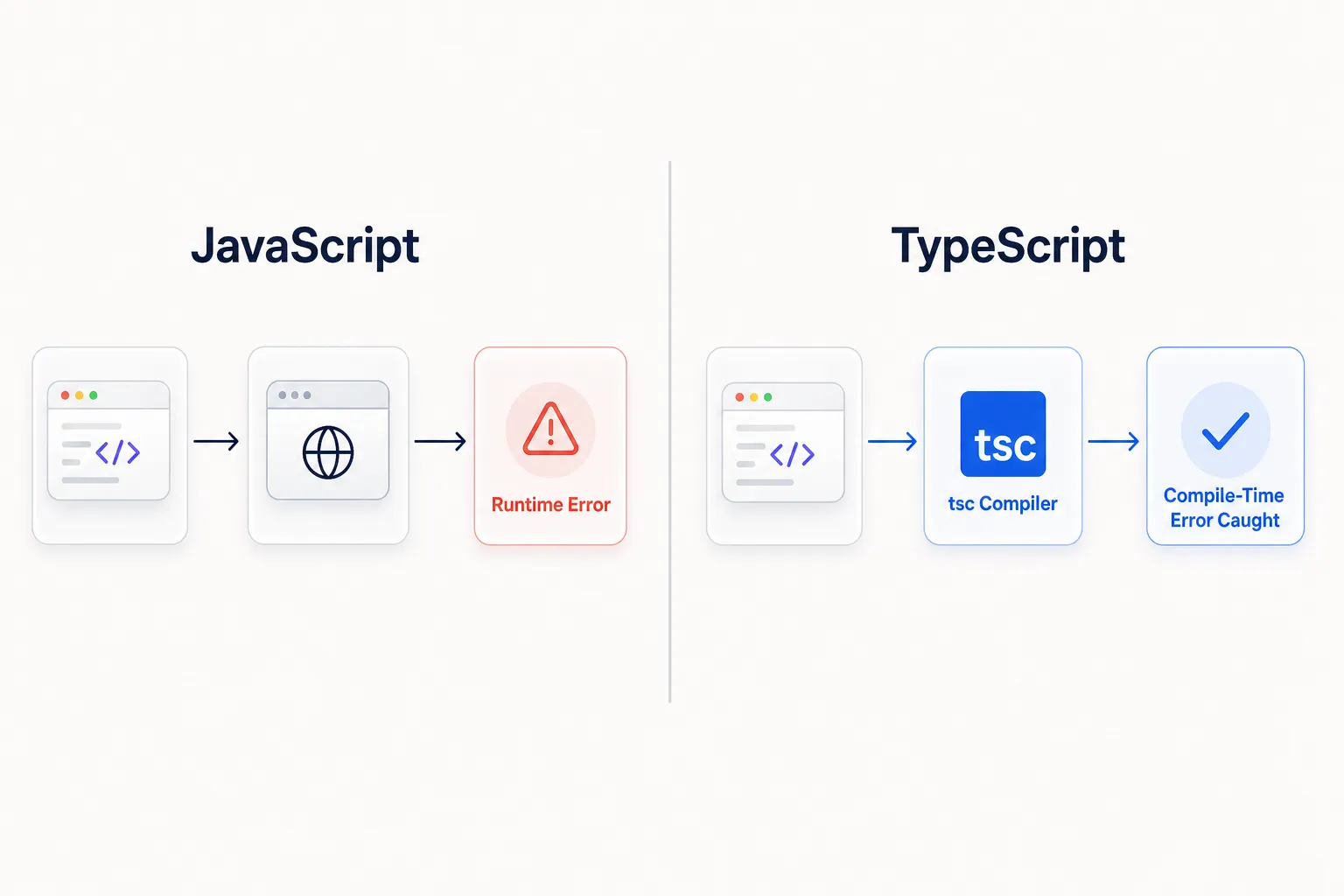
The compiler catches both mistakes before the code runs. That’s the core value proposition: move errors from runtime to compile time.
TypeScript as a Superset of JavaScript
Every valid JavaScript file is also valid TypeScript. You can rename app.js to app.ts and it will compile without modification. TypeScript only adds syntax on top of JavaScript — type annotations, interfaces, generics — all of which are stripped out during compilation, leaving plain JavaScript that any browser or Node.js runtime can execute.
Understanding Type Annotations
Type annotations are the most fundamental TypeScript feature. You declare what type a value should be using a colon syntax.
// Variable annotations
const username: string = "alice";
const age: number = 30;
const isAdmin: boolean = false;
const scores: number[] = [95, 87, 92];

// Function parameter and return type annotations
function formatCurrency(amount: number, currency: string): string {
  return `${currency}${amount.toFixed(2)}`;
}

console.log(formatCurrency(19.9, "$")); // "$19.90"
Type Inference
TypeScript doesn’t require annotations everywhere. Its compiler is smart enough to infer types from values and usage.
// TypeScript infers 'string' from the assigned value
const greeting = "Hello, World!";
greeting.toUpperCase(); // ✅ valid
greeting.push("!");     // ❌ Error: Property 'push' does not exist on type 'string'

// TypeScript infers return type as 'number'
function multiply(a: number, b: number) {
  return a * b; // inferred return type: number
}
Tip: Let inference do the work for local variables assigned immediately. Explicitly annotate function signatures, especially public APIs and function parameters — that’s where the contract matters most.
Interfaces vs. Type Aliases
This is one of the most commonly confused distinctions in TypeScript. Both let you name and reuse a type shape, but they behave differently in key ways.
What an Interface Is
An interface describes the shape of an object — what properties it has and what types those properties are.
interface User {
  id: number;
  username: string;
  email: string;
  isActive: boolean;
  createdAt: Date;
}

function getUserDisplayName(user: User): string {
  return user.isActive ? user.username : "(inactive)";
}

const adminUser: User = {
  id: 1,
  username: "alice",
  email: "alice@example.com",
  isActive: true,
  createdAt: new Date(),
};

console.log(getUserDisplayName(adminUser)); // "alice"
Interfaces support declaration merging — you can define the same interface name in multiple places and TypeScript merges them. This is especially useful for extending third-party library types.
interface Product {
  id: number;
  name: string;
}

// Merged — Product now has id, name, AND price
interface Product {
  price: number;
}

const laptop: Product = { id: 42, name: "ThinkPad", price: 1299 };
What a Type Alias Is
A type alias creates a name for any type — not just object shapes. It can name primitives, unions, intersections, tuples, and more.
type OrderStatus = "pending" | "processing" | "shipped" | "delivered" | "cancelled";
type Coordinates = [number, number];
type Callback = (error: Error | null, result: string) => void;

type Product = {
  id: number;
  name: string;
  price: number;
};
Key Differences at a Glance
| Feature | Interface | Type Alias |
|---|---|---|
| Object shape definition | ✅ Yes | ✅ Yes |
| Primitive type aliasing | ❌ No | ✅ Yes |
| Union types | ❌ No | ✅ Yes |
| Tuple types | Limited | ✅ Yes |
| Declaration merging | ✅ Yes | ❌ No |
extends keyword |
✅ Yes | Via & intersection |
implements in classes |
✅ Yes | ✅ Yes |
| Error messages | Often cleaner | Can be verbose |
When to Use Which
Use interfaces when:
- Defining the shape of objects, especially domain models (
User,Product,Order) - Designing public APIs of libraries or modules
- Working with class contracts
- You need declaration merging
Use type aliases when:
- Creating union or intersection types
- Aliasing primitives or tuples
- Composing complex types from simpler ones
Note: In most modern TypeScript codebases, teams pick one convention and stick with it. Both work well for object shapes. The differences matter most at the edges.
Union Types
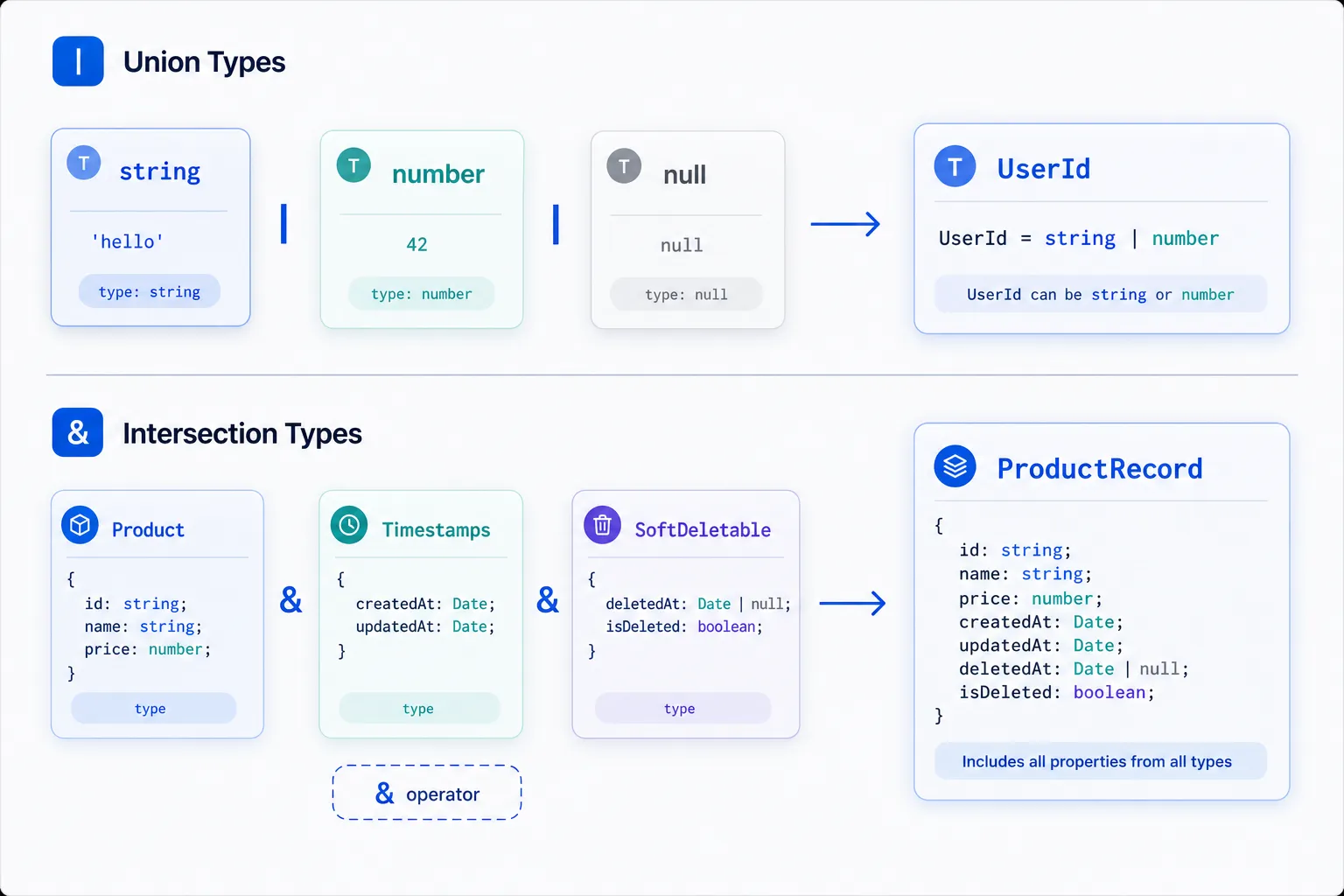
A union type says: this value can be one of several types. The pipe character | separates the possibilities.
type PaymentMethod = "credit_card" | "paypal" | "bank_transfer" | "crypto";

interface OrderSummary {
  orderId: string;
  total: number;
  status: "pending" | "paid" | "refunded";
  paymentMethod: PaymentMethod;
}

function processPayment(method: PaymentMethod, amount: number): string {
  if (method === "crypto") {
    return `Processing crypto payment of $${amount} — please wait for confirmation`;
  }
  return `Processing ${method} payment of $${amount}`;
}
Handling Unions Safely with Narrowing
When a value could be multiple types, TypeScript requires you to narrow it before using type-specific methods.
type ApiResponse = { success: true; data: User } | { success: false; error: string };

function handleResponse(response: ApiResponse): string {
  if (response.success) {
    // Here TypeScript knows: response.data is User
    return `Welcome, ${response.data.username}`;
  } else {
    // Here TypeScript knows: response.error is string
    return `Error: ${response.error}`;
  }
}

// A more practical example: ID that can be string or number
type UserId = string | number;

function formatUserId(id: UserId): string {
  if (typeof id === "number") {
    return `USER-${id.toString().padStart(6, "0")}`;
  }
  return id.toUpperCase();
}

console.log(formatUserId(42));      // "USER-000042"
console.log(formatUserId("abc-7")); // "ABC-7"
Intersection Types
While a union says either A or B, an intersection says both A and B — the resulting type has all properties from both types combined.
interface Timestamps {
  createdAt: Date;
  updatedAt: Date;
}

interface SoftDeletable {
  deletedAt: Date | null;
  isDeleted: boolean;
}

interface Product {
  id: number;
  name: string;
  price: number;
  stock: number;
}

// A full database row has all three
type ProductRecord = Product & Timestamps & SoftDeletable;

const dbProduct: ProductRecord = {
  id: 7,
  name: "Mechanical Keyboard",
  price: 149.99,
  stock: 50,
  createdAt: new Date("2024-01-01"),
  updatedAt: new Date("2024-06-15"),
  deletedAt: null,
  isDeleted: false,
};
This pattern is powerful for composing reusable traits — Timestamps, SoftDeletable, Auditable — that you mix into domain models. It keeps your types DRY and consistent across your data layer.
Generic Functions
Generics are where TypeScript’s type system becomes genuinely powerful. They let you write functions and data structures that work with any type while still being fully type-safe.
The Problem Without Generics
// Without generics: you'd write one version per type
function getFirstNumber(arr: number[]): number | undefined {
  return arr[0];
}

function getFirstString(arr: string[]): string | undefined {
  return arr[0];
}

// Or lose type safety entirely with 'any'
function getFirst(arr: any[]): any {
  return arr[0]; // ❌ returns 'any' — type information is gone
}
Generics to the Rescue
// One generic function — works for any type, stays type-safe
function getFirst<T>(arr: T[]): T | undefined {
  return arr[0];
}

const firstScore = getFirst([95, 87, 92]);       // TypeScript infers: number | undefined
const firstUser = getFirst(["alice", "bob"]);     // TypeScript infers: string | undefined

// TypeScript knows the return type matches the input
const score = getFirst([95, 87, 92]);
if (score !== undefined) {
  console.log(score.toFixed(2)); // ✅ valid — TypeScript knows it's a number
}
The T is a type parameter — a placeholder that TypeScript fills in based on what you pass. It’s inferred automatically in most cases.
Generic Constraints
You can constrain a type parameter so it must satisfy certain requirements:
interface HasId {
  id: number;
}

// T must have at minimum an 'id' property
function findById<T extends HasId>(collection: T[], targetId: number): T | undefined {
  return collection.find((item) => item.id === targetId);
}

const users: User[] = [
  { id: 1, username: "alice", email: "alice@example.com", isActive: true, createdAt: new Date() },
  { id: 2, username: "bob",   email: "bob@example.com",   isActive: false, createdAt: new Date() },
];

const found = findById(users, 1); // TypeScript infers: User | undefined
console.log(found?.username);     // "alice"

// Works equally well for products:
const products: Product[] = [
  { id: 10, name: "Monitor", price: 399, stock: 20 },
];
const monitor = findById(products, 10); // TypeScript infers: Product | undefined
A Generic API Wrapper
Here’s a realistic, reusable generic you’d actually put in a production codebase:
interface PaginatedResponse<T> {
  data: T[];
  total: number;
  page: number;
  pageSize: number;
  hasNextPage: boolean;
}

async function fetchPaginated<T>(
  endpoint: string,
  page: number,
  pageSize: number = 20
): Promise<PaginatedResponse<T>> {
  const url = `${endpoint}?page=${page}&pageSize=${pageSize}`;
  const response = await fetch(url);

  if (!response.ok) {
    throw new Error(`Request failed: ${response.status} ${response.statusText}`);
  }

  return response.json() as Promise<PaginatedResponse<T>>;
}

// Usage — fully typed based on the type argument you provide
const userPage = await fetchPaginated<User>("/api/users", 1);
const productPage = await fetchPaginated<Product>("/api/products", 2, 50);

console.log(userPage.data[0].username);  // ✅ TypeScript knows: username exists on User
console.log(productPage.data[0].price); // ✅ TypeScript knows: price exists on Product
Understanding tsconfig.json
Every TypeScript project needs a tsconfig.json. This file tells the TypeScript compiler how to behave — what files to include, how strict to be, and what JavaScript version to output.
# Create a new project with a default tsconfig
npx tsc --init
Here’s a production-ready configuration with the most important options explained:
{
  "compilerOptions": {
    // --- Output ---
    "target": "ES2020",          // Compile to ES2020 JavaScript
    "module": "commonjs",        // Use CommonJS modules (Node.js)
    "outDir": "./dist",          // Output compiled files to /dist
    "rootDir": "./src",          // Source files live in /src

    // --- Type Safety ---
    "strict": true,              // Enable ALL strict checks (recommended)
    "noImplicitAny": true,       // Error on implicit 'any' types
    "strictNullChecks": true,    // null/undefined must be handled explicitly
    "noUncheckedIndexedAccess": true, // Array[n] returns T | undefined

    // --- Code Quality ---
    "noUnusedLocals": true,      // Error on unused local variables
    "noUnusedParameters": true,  // Error on unused function parameters
    "noImplicitReturns": true,   // All code paths must return a value
    "exactOptionalPropertyTypes": true, // Optional props can't be set to undefined explicitly

    // --- Module Resolution ---
    "moduleResolution": "node",  // Resolve modules like Node.js does
    "esModuleInterop": true,     // Allows default imports from CommonJS modules
    "resolveJsonModule": true,   // Allow importing .json files

    // --- Source Maps ---
    "sourceMap": true,           // Generate .map files for debugging
    "declaration": true,         // Generate .d.ts type declaration files

    // --- Compatibility ---
    "lib": ["ES2020", "DOM"],    // Include type definitions for ES2020 and browser APIs
    "skipLibCheck": true         // Skip type-checking of .d.ts in node_modules
  },
  "include": ["src/**/*"],
  "exclude": ["node_modules", "dist", "**/*.test.ts"]
}
The strict Flag — Don’t Skip It
The single most impactful compiler option is "strict": true. It’s a shorthand that enables a bundle of safety checks:
| Strict Check | What It Catches |
|---|---|
noImplicitAny |
Variables/params without a type that TypeScript can’t infer |
strictNullChecks |
Values that might be null or undefined must be checked |
strictFunctionTypes |
Prevents unsafe function type assignments |
strictBindCallApply |
Ensures bind, call, apply are type-safe |
strictPropertyInitialization |
Class properties must be initialized in constructor |
noImplicitThis |
this in functions must have a declared type |
Warning: If you’re adding TypeScript to an existing JavaScript codebase, don’t enable
strict: trueall at once. Turn on individual checks one at a time. Enabling strict mode on a large codebase in one step will produce hundreds of errors.
The TypeScript Compilation Process
TypeScript never runs in a browser or in Node.js directly. It must be compiled to JavaScript first. Here’s exactly what happens:
flowchart LR
  A([.ts Source Files]) --> B[TypeScript Compiler / tsc]
  B --> C{Type Checking}
  C -- Errors --> D([❌ Build Fails with Diagnostics])
  C -- OK --> E[Code Emission]
  E --> F([.js Output Files])
  E --> G([.d.ts Declaration Files])
  E --> H([.js.map Source Maps])
  F --> I([Node.js / Browser Runtime])
Phase 1: Parsing
The compiler reads your .ts files and builds an Abstract Syntax Tree (AST) — a tree representation of your code’s structure. Type annotations are parsed but treated as metadata at this stage.
Phase 2: Type Checking
The compiler walks the AST, resolves every type, and verifies that all operations are valid. If it finds a mismatch — like passing a string where a number is expected — it reports a diagnostic error and (by default) stops.
Phase 3: Emission
If type checking passes, the compiler strips all TypeScript-specific syntax (type annotations, interfaces, generics) and emits plain .js files. The resulting JavaScript is valid for whatever target you specified in tsconfig.json.
# Compile the project once
npx tsc

# Watch mode — recompile on file changes
npx tsc --watch

# Type-check only, don't emit files
npx tsc --noEmit

# Example project structure after compilation
# src/
#   user.ts       →  dist/user.js + dist/user.d.ts + dist/user.js.map
#   product.ts    →  dist/product.js + dist/product.d.ts + dist/product.js.map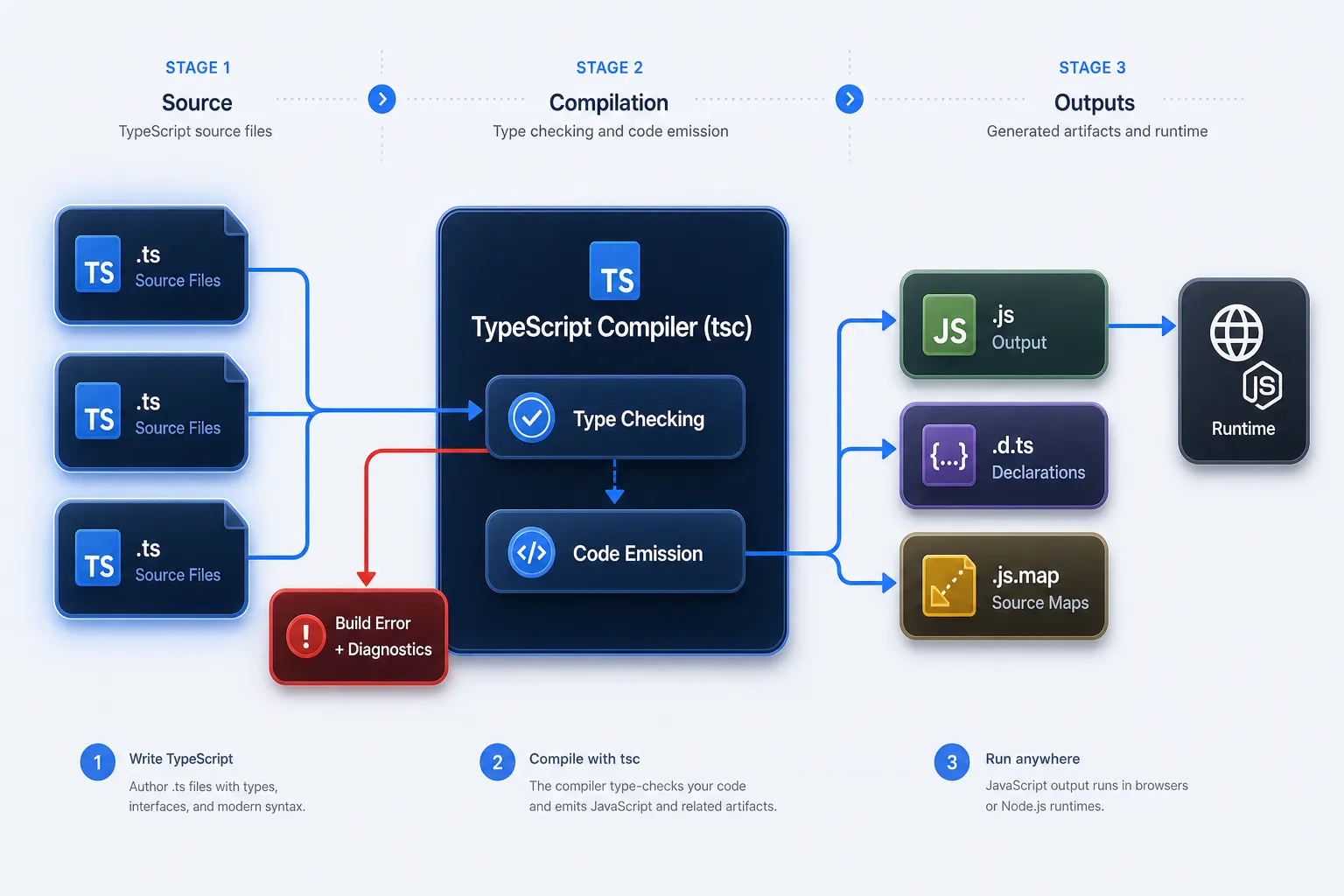
TypeScript in the Modern Build Ecosystem
In production, tsc is often not the final step. Bundlers like Vite, esbuild, and webpack (with ts-loader) handle TypeScript as part of a larger build pipeline. Many of these tools use esbuild to transpile TypeScript (strip types and emit JS) extremely fast, while leaving type-checking to a separate tsc --noEmit step run in CI.
This separation of transpilation and type-checking is a key reason modern TypeScript build times are fast despite large codebases.
A Practical End-to-End Example
Let’s put it all together: interfaces, generics, unions, and intersection types in a realistic mini-module for a product catalog service.
// types.ts — shared type definitions

export interface Timestamps {
  createdAt: Date;
  updatedAt: Date;
}

export interface Product {
  id: number;
  name: string;
  description: string;
  price: number;
  category: "electronics" | "clothing" | "furniture" | "food";
  isAvailable: boolean;
}

export type ProductRecord = Product & Timestamps;

export interface PaginatedResult<T> {
  items: T[];
  totalCount: number;
  currentPage: number;
  totalPages: number;
}

export type SortOrder = "asc" | "desc";

export interface ProductFilters {
  category?: Product["category"];
  minPrice?: number;
  maxPrice?: number;
  isAvailable?: boolean;
  sortBy?: keyof Pick<Product, "name" | "price">;
  sortOrder?: SortOrder;
}
// productService.ts — business logic using the types above
import type { Product, ProductRecord, ProductFilters, PaginatedResult } from "./types";
const catalog: ProductRecord[] = [
{
id: 1, name: "Wireless Headphones", description: "Over-ear ANC headphones",
price: 249.99, category: "electronics", isAvailable: true,
createdAt: new Date("2024-01-10"), updatedAt: new Date("2024-07-01"),
},
{
id: 2, name: "Wool Sweater", description: "Merino wool, crew neck",
price: 89.99, category: "clothing", isAvailable: true,
createdAt: new Date("2024-02-05"), updatedAt: new Date("2024-06-20"),
},
{
id: 3, name: "Standing Desk", description: "Electric height-adjustable",
price: 699.00, category: "furniture", isAvailable: false,
createdAt: new Date("2024-03-15"), updatedAt: new Date("2024-07-10"),
},
];
function filterProducts(filters: ProductFilters): ProductRecord[] {
let results = [...catalog];
if (filters.category) {
results = results.filter((p) => p.category === filters.category);
}
if (filters.minPrice !== undefined) {
results = results.filter((p) => p.price >= filters.minPrice!);
}
if (filters.maxPrice !== undefined) {
results = results.filter((p) => p.price <= filters.maxPrice!);
}
if (filters.isAvailable !== undefined) {
results = results.filter((p) => p.isAvailable === filters.isAvailable);
}
if (filters.sortBy) {
const key = filters.sortBy;
const order = filters.sortOrder ?? "asc";
results.sort((a, b) => {
const valA = a[key];
const valB = b[key];
if (typeof valA === "string" && typeof valB === "string") {
return order === "asc" ? valA.localeCompare(valB) : valB.localeCompare(valA);
}
return order === "asc" ? (valA as number) - (valB as number) : (valB as number) - (valA as number);
});
}
return results;
}
function paginate<T>(items: T[], page: number, pageSize: number): PaginatedResult<T> {
const start = (page - 1) * pageSize;
const sliced = items.slice(start, start + pageSize);
return {
items: sliced,
totalCount: items.length,
currentPage: page,
totalPages: Math.ceil(items.length / pageSize),
};
}
// Usage
const available = filterProducts({ isAvailable: true, sortBy: "price", sortOrder: "asc" });
const page1 = paginate(available, 1, 10);
console.log(`Found ${page1.totalCount} products, page 1 of ${page1.totalPages}`);
console.log(page1.items.map((p) => `${p.name}: $${p.price}`));
// Found 2 products, page 1 of 1
// ["Wool Sweater: $89.99", "Wireless Headphones: $249.99"]Notice how paginate<T> is generic and reusable — call it with ProductRecord[], User[], or Order[] and it stays fully typed throughout.
Trade-offs and Pitfalls
| Pitfall | What Happens | How to Avoid |
|---|---|---|
Overusing any |
Defeats the entire type system | Enable noImplicitAny; use unknown instead |
Type assertions (as) |
Bypasses checking — lies to the compiler | Use narrowing (typeof, instanceof, discriminated unions) |
Skipping strict mode |
Miss entire classes of null/undefined bugs | Enable strict: true from day one |
| Huge interface inheritance chains | Hard to trace what a type actually contains | Prefer composition via intersections and small interfaces |
| Treating TypeScript as a runtime guard | Types are erased — they don’t protect you at runtime | Combine TypeScript with runtime validators (Zod, Valibot) |
any leaking from untyped libraries |
Untyped npm packages spread any everywhere |
Install @types/package-name or write local .d.ts stubs |
Warning: TypeScript’s types exist only at compile time. If your API returns data shaped differently than your interface declares, TypeScript will not catch that at runtime. For runtime safety on external data, use a schema validation library like Zod and derive your TypeScript types from the schema.
Best Practices
- Enable
strict: trueon new projects from the start. Retrofitting strict checks onto a large codebase is painful. The cost of doing it correctly upfront is negligible. - Prefer
unknownoveranyfor genuinely unknown values.unknownforces you to narrow before using;anysilently destroys type safety. - Use discriminated unions for state machines. A
status: "loading" | "success" | "error"field with a matchingdataorerrorfield creates exhaustive, type-safe handling. - Keep interfaces small and compose them. A
Usertype with 30 properties is hard to reason about. AUser = BaseIdentity & ProfileDetails & AccountSettingsis explicit and composable. - Avoid
astype assertions unless you have no other option. When you writeas SomeType, you’re telling the compiler “trust me” — and the compiler will. If you’re wrong, the bug is invisible. - Run
tsc --noEmitin CI. Bundlers like esbuild strip types without checking them. A separate type-check step in your CI pipeline ensures type errors block deployments. - Use
satisfiesfor object literals. Thesatisfiesoperator (TypeScript 4.9+) checks a value against a type without widening it — great for config objects and enums.
const routes = {
  home: "/",
  users: "/users",
  products: "/products",
} satisfies Record<string, string>;

// TypeScript still knows the exact keys — no widening to string
const homeRoute = routes.home; // type: "/" (literal), not string
Conclusion
TypeScript earns its place in any serious JavaScript codebase not by being a new language, but by being a better contract for the one you already use. Here’s what to carry forward:
- Type annotations document intent and let the compiler enforce it.
- Interfaces define object contracts; type aliases compose complex types including unions and tuples.
- Union types model values that can be one of several things; use narrowing to handle them safely.
- Intersection types combine multiple shapes — the foundation of composable, reusable domain models.
- Generics let you write algorithms once that work across many types without sacrificing safety.
tsconfig.jsoncontrols everything: strictness, target, output, and project scope. Start withstrict: true.- Compilation erases types — TypeScript lives at development time, not runtime. Pair it with schema validators for runtime data.
Your next step: take an existing JavaScript module you own, rename it to .ts, add tsc --noEmit to your package.json scripts, and turn on strict. The errors the compiler reports are real bugs — and you just caught them before your users did.
Further Reading
- TypeScript Handbook — the official, comprehensive reference. Start with “Everyday Types”.
- TypeScript Playground — run TypeScript in the browser, inspect inferred types, and share snippets.
- Zod Documentation — runtime schema validation that generates TypeScript types, the natural complement to TypeScript’s compile-time checks.
- Total TypeScript (Matt Pocock) — the best collection of practical TypeScript exercises and patterns for going beyond the basics.
tsconfigReference — complete documentation for every compiler option with explanations and examples.