React State Management Deep Dive: Prop Drilling, Context API, React.memo, useMemo, and useCallback
React State Management Deep Dive: Prop Drilling, Context API, React.memo, useMemo, and useCallback
TL;DR: Prop drilling breaks maintainability at scale; the Context API solves sharing without threading props manually; and React.memo, useMemo, and useCallback are surgical performance tools — not defaults. This article explains all five concepts from first principles, with real-world code and honest trade-offs.
Introduction
Every React developer hits the same wall. The application starts clean: a parent component holds some state, passes it to a child, done. Then a new feature arrives. Now a deeply nested component needs that same state. You add another prop. Then another. Then a sibling component needs it too. Suddenly every intermediate component in the tree is accepting and forwarding props it has no business caring about. The code becomes brittle, refactoring becomes dangerous, and your team starts dreading touching the component tree.
This is the state management problem — and it is fundamentally architectural, not technical. No library fixes bad architecture. Understanding the tools React ships with is the first step toward making good decisions.
This article targets intermediate React developers who are comfortable with hooks and functional components but want a rigorous mental model for state organization and performance optimization. We will not touch Redux, Zustand, or any external library — the goal is mastery of what React itself provides.
Part 1 — The Problem: Why State Management Gets Hard
React's data model is intentionally simple: state flows down through props, events flow up through callbacks. This one-way data flow is a feature, not a limitation. It makes components predictable and testable.
The friction starts when the component tree grows in depth and breadth simultaneously. Consider a dashboard application:
AppholdscurrentUser(fetched on mount)DashboardneedscurrentUserfor a greetingSidebarneedscurrentUserfor role-based menu itemsUserAvatar(nested four levels inside aTopbar→NavRight→ProfileMenu→UserAvatar) needscurrentUserto render the profile picture
Every component between App and UserAvatar must accept and pass currentUser even if it never uses it. This is prop drilling.

The Four Real Problems With Prop Drilling
Coupling: Intermediate components become aware of data they don't own and shouldn't care about.
Refactoring friction: Renaming a prop means updating every layer in the chain.
Hidden dependencies: Reading a component in isolation doesn't tell you where its data comes from.
Scalability cliff: Adding a new consumer at the leaf level means threading the prop through every ancestor again.
Part 2 — Prop Drilling in Code
Here is a realistic (if simplified) example. Notice how userRole flows through Layout and Sidebar purely to reach NavMenu, which is the only component that actually uses it.
// App.tsx — the data owner
const App = () => {
  const [userRole, setUserRole] = React.useState<'admin' | 'viewer'>('viewer');
  return <Layout userRole={userRole} />;
};

// Layout.tsx — passes through, never uses userRole
const Layout = ({ userRole }: { userRole: string }) => (
  <div className="layout">
    <Sidebar userRole={userRole} />
    <main>Main content</main>
  </div>
);

// Sidebar.tsx — passes through, never uses userRole
const Sidebar = ({ userRole }: { userRole: string }) => (
  <aside>
    <NavMenu userRole={userRole} />
  </aside>
);

// NavMenu.tsx — FINALLY uses userRole
const NavMenu = ({ userRole }: { userRole: string }) => (
  <nav>
    {userRole === 'admin' && <a href="/admin">Admin Panel</a>}
    <a href="/dashboard">Dashboard</a>
  </nav>
);
Layout and Sidebar are now coupled to the userRole prop type. If you rename it to role, you touch four files. If you add a userName prop for a different feature, you thread it through the same chain.
Note: Prop drilling is not always wrong. For one or two levels, it is often the clearest solution. The problem starts at three or more levels, or when many unrelated siblings need the same piece of state.
Part 3 — The Context API: Shared State Without the Chain
The Context API was designed to solve exactly this problem. It lets you broadcast a value from a Provider anywhere in the tree and consume it at any depth, without manually threading it through every intermediate component.
The Mental Model
Think of Context as a dedicated radio frequency. The Provider is the transmitter. Any Consumer tuned to the same frequency receives the signal — regardless of how many walls (component levels) are between them.
flowchart TD
  Provider["AuthContext.Provider\n(broadcasts currentUser)"] --> Layout
  Layout --> Sidebar
  Layout --> Topbar
  Sidebar --> NavMenu["NavMenu\n useContext(AuthContext) ✓"]
  Topbar --> NavRight
  NavRight --> ProfileMenu
  ProfileMenu --> UserAvatar["UserAvatar\n useContext(AuthContext) ✓"]
Creating and Consuming a Context
The pattern has three parts: define the context, provide it near the top of the tree, consume it wherever needed.
// auth-context.tsx
import React, { createContext, useContext, useState, ReactNode } from 'react';

type User = {
  id: string;
  name: string;
  role: 'admin' | 'viewer';
  avatarUrl: string;
};

type AuthContextValue = {
  currentUser: User | null;
  login: (user: User) => void;
  logout: () => void;
};

// 1. Create the context with a meaningful default
const AuthContext = createContext<AuthContextValue | undefined>(undefined);

// 2. Build a custom hook for safe consumption
export const useAuth = (): AuthContextValue => {
  const context = useContext(AuthContext);
  if (!context) {
    throw new Error('useAuth must be used inside an AuthProvider');
  }
  return context;
};

// 3. Create the Provider component
export const AuthProvider = ({ children }: { children: ReactNode }) => {
  const [currentUser, setCurrentUser] = useState<User | null>(null);

  const login = (user: User) => setCurrentUser(user);
  const logout = () => setCurrentUser(null);

  return (
    <AuthContext.Provider value={{ currentUser, login, logout }}>
      {children}
    </AuthContext.Provider>
  );
};
Now wire the Provider at the application root:
// main.tsx
import { AuthProvider } from './auth-context';
import App from './App';

const Root = () => (
  <AuthProvider>
    <App />
  </AuthProvider>
);
And consume it in any leaf component without any intermediate prop passing:
// UserAvatar.tsx — no props needed from parent
import { useAuth } from '../auth-context';

const UserAvatar = () => {
  const { currentUser } = useAuth();

  if (!currentUser) return <div className="avatar avatar--guest" />;

  return (
    <img
      src={currentUser.avatarUrl}
      alt={`${currentUser.name}'s avatar`}
      className="avatar"
    />
  );
};
// NavMenu.tsx
import { useAuth } from '../auth-context';

const NavMenu = () => {
  const { currentUser, logout } = useAuth();

  return (
    <nav>
      {currentUser?.role === 'admin' && <a href="/admin">Admin Panel</a>}
      <a href="/dashboard">Dashboard</a>
      <button onClick={logout}>Sign Out</button>
    </nav>
  );
};
Layout, Sidebar, Topbar, NavRight, and ProfileMenu are now completely free of userRole and currentUser props. They own only what they actually use.
When Context API Works Well
| Use case | Good fit? | Reason |
|---|---|---|
| Authentication state | ✅ Excellent | Needed everywhere, changes rarely |
| Theme (dark/light mode) | ✅ Excellent | Global, low-frequency updates |
| User preferences / locale | ✅ Good | Global, set-and-forget |
| Shopping cart state | ⚠️ Acceptable | Updates more frequently; watch performance |
| Form state | ❌ Poor | High-frequency updates cause excessive re-renders |
| Server data / async state | ❌ Poor | Use React Query or SWR instead |
Warning: Every component that consumes a context re-renders whenever the context value changes. If you put frequently updating state (e.g., a mouse position or scroll offset) into a context consumed by 30 components, you will hammer performance. Context is optimized for low-frequency global state.
Part 4 — Understanding React Re-renders
Before memoization makes sense, you need a firm grip on when React re-renders components.
React re-renders a component when:
Its own state changes.
Its parent re-renders (even if the props it receives did not change).
A context it consumes changes.
Point 2 is the one that surprises people. By default, a child component re-renders whenever its parent does — regardless of whether any of its props changed. This is React's default behavior, and it is usually fine because React's reconciler is fast. The virtual DOM diff is cheap for most component trees.
Performance problems arise when:
A component is expensive to render (large lists, heavy computation inside the render)
A high-frequency state update (timer, scroll, input) lives near the top of a large tree
A stable component keeps re-rendering despite receiving the same props
The three memoization tools address these exact scenarios.
Part 5 — React.memo: Memoizing Components
React.memo is a higher-order component. It wraps a functional component and tells React: "Only re-render this component if its props actually changed. If the parent re-renders but this component's props are the same, skip it."
// ThemeToggle.tsx — renders a button, receives only two stable props
import React from 'react';

type Props = {
  theme: 'light' | 'dark';
  onToggle: () => void;
};

const ThemeToggle = React.memo(({ theme, onToggle }: Props) => {
  console.log('[ThemeToggle] rendered');
  return (
    <button onClick={onToggle} className={`toggle toggle--${theme}`}>
      Switch to {theme === 'light' ? 'Dark' : 'Light'} Mode
    </button>
  );
});

export default ThemeToggle;
Without React.memo, every re-render of the parent (e.g., a clock ticking every second) would re-render ThemeToggle. With it, React performs a shallow equality check on the props object. If theme and onToggle have the same reference, the render is skipped.
The Referential Equality Trap
Here is the classic gotcha that kills React.memo's effectiveness:
// ❌ This breaks React.memo — a NEW function is created on every render
const Dashboard = () => {
  const [ticks, setTicks] = useState(0);

  useEffect(() => {
    const id = setInterval(() => setTicks(t => t + 1), 1000);
    return () => clearInterval(id);
  }, []);

  // handleToggle is recreated every second → ThemeToggle WILL re-render
  const handleToggle = () => setTheme(prev => prev === 'light' ? 'dark' : 'light');

  return <ThemeToggle theme={theme} onToggle={handleToggle} />;
};
Even though ThemeToggle is wrapped in React.memo, it still re-renders every second because handleToggle is a new function reference on every render. This is where useCallback enters.
Part 6 — useCallback: Stable Function References
useCallback memoizes a function. It returns the same function reference across renders as long as its dependency array hasn't changed.
const Dashboard = () => {
  const [ticks, setTicks] = useState(0);
  const [theme, setTheme] = useState<'light' | 'dark'>('light');

  useEffect(() => {
    const id = setInterval(() => setTicks(t => t + 1), 1000);
    return () => clearInterval(id);
  }, []);

  // ✅ handleToggle is created once and reused — same reference every render
  const handleToggle = useCallback(() => {
    setTheme(prev => (prev === 'light' ? 'dark' : 'light'));
  }, []); // no dependencies — setTheme is stable

  return (
    <div>
      <p>Uptime: {ticks}s</p>
      <ThemeToggle theme={theme} onToggle={handleToggle} />
    </div>
  );
};
Now ThemeToggle truly skips re-rendering on every clock tick. handleToggle is the same reference, theme hasn't changed — React.memo's shallow check passes.
Tip:
useCallback(fn, deps)is syntactic sugar foruseMemo(() => fn, deps). They use the same memoization mechanism. UseuseCallbackfor functions,useMemofor values.
useCallback With Dependencies
// A fetch function that depends on a userId — recreate only when userId changes
const useUserData = (userId: string) => {
  const [data, setData] = useState<UserProfile | null>(null);

  const fetchUser = useCallback(async () => {
    const response = await fetch(`/api/users/${userId}`);
    const json = await response.json();
    setData(json);
  }, [userId]); // only recreated when userId changes

  useEffect(() => {
    fetchUser();
  }, [fetchUser]);

  return data;
};
Part 7 — useMemo: Memoizing Expensive Computations
useMemo caches the result of a computation. Use it when you have a calculation that is expensive to run and whose inputs change infrequently.
// A dashboard that renders analytics over potentially thousands of transactions
type Transaction = { amount: number; category: string; date: string };

const AnalyticsSummary = ({ transactions }: { transactions: Transaction[] }) => {
  const [filter, setFilter] = useState('');

  // ✅ Only recalculates when `transactions` changes, not when `filter` changes
  const categoryTotals = useMemo(() => {
    console.log('[useMemo] recalculating category totals...');
    return transactions.reduce<Record<string, number>>((acc, tx) => {
      acc[tx.category] = (acc[tx.category] ?? 0) + tx.amount;
      return acc;
    }, {});
  }, [transactions]);

  const filteredCategories = Object.entries(categoryTotals).filter(([cat]) =>
    cat.toLowerCase().includes(filter.toLowerCase())
  );

  return (
    <div>
      <input
        value={filter}
        onChange={e => setFilter(e.target.value)}
        placeholder="Filter categories..."
      />
      <ul>
        {filteredCategories.map(([cat, total]) => (
          <li key={cat}>
            {cat}: ${total.toFixed(2)}
          </li>
        ))}
      </ul>
    </div>
  );
};
Without useMemo, typing into the filter input triggers a re-render, which re-runs the reduce over thousands of transactions on every keystroke. With useMemo, the expensive calculation is cached — typing only re-runs the cheap filter on the cached result.
useMemo for Stable Object References
Another valuable use case: preventing downstream re-renders caused by object identity.
// ❌ contextValue is recreated every render — all consumers re-render unnecessarily
const ThemeProvider = ({ children }: { children: ReactNode }) => {
  const [theme, setTheme] = useState<'light' | 'dark'>('light');
  const toggle = useCallback(() => setTheme(t => t === 'light' ? 'dark' : 'light'), []);

  // ❌ new object reference every render
  const contextValue = { theme, toggle };

  return <ThemeContext.Provider value={contextValue}>{children}</ThemeContext.Provider>;
};

// ✅ contextValue is stable unless theme changes
const ThemeProviderOptimized = ({ children }: { children: ReactNode }) => {
  const [theme, setTheme] = useState<'light' | 'dark'>('light');
  const toggle = useCallback(() => setTheme(t => t === 'light' ? 'dark' : 'light'), []);

  const contextValue = useMemo(() => ({ theme, toggle }), [theme, toggle]);

  return <ThemeContext.Provider value={contextValue}>{children}</ThemeContext.Provider>;
};
This pattern is particularly important when building Context Providers — without it, every state change in the Provider component creates a new context value object, forcing all consumers to re-render even if the relevant data hasn't changed.
Part 8 — A Complete, Production-Style Example
Let's put all five concepts together in a realistic user profile dashboard.
// user-context.tsx
import React, {
  createContext, useContext, useState, useMemo, useCallback, ReactNode
} from 'react';

type UserProfile = {
  id: string;
  name: string;
  email: string;
  role: 'admin' | 'viewer';
  preferences: { theme: 'light' | 'dark'; language: string };
};

type UserContextValue = {
  profile: UserProfile | null;
  updateTheme: (theme: 'light' | 'dark') => void;
  logout: () => void;
};

const UserContext = createContext<UserContextValue | undefined>(undefined);

export const useUser = () => {
  const ctx = useContext(UserContext);
  if (!ctx) throw new Error('useUser must be inside UserProvider');
  return ctx;
};

export const UserProvider = ({ children }: { children: ReactNode }) => {
  const [profile, setProfile] = useState<UserProfile | null>({
    id: 'u_001',
    name: 'Priya Nair',
    email: 'priya@example.com',
    role: 'admin',
    preferences: { theme: 'light', language: 'en' },
  });

  const updateTheme = useCallback((theme: 'light' | 'dark') => {
    setProfile(prev =>
      prev ? { ...prev, preferences: { ...prev.preferences, theme } } : null
    );
  }, []);

  const logout = useCallback(() => setProfile(null), []);

  // Stable context object — only changes when profile changes
  const value = useMemo(
    () => ({ profile, updateTheme, logout }),
    [profile, updateTheme, logout]
  );

  return <UserContext.Provider value={value}>{children}</UserContext.Provider>;
};
// StatsPanel.tsx — expensive calculation, memoized
import React, { useMemo } from 'react';

type Stat = { label: string; value: number };

const computeRankedStats = (stats: Stat[]): Stat[] => {
  // Imagine this is a complex sort + normalization over a large dataset
  return [...stats].sort((a, b) => b.value - a.value);
};

const StatsPanel = React.memo(({ stats }: { stats: Stat[] }) => {
  const rankedStats = useMemo(() => computeRankedStats(stats), [stats]);

  return (
    <ul className="stats-panel">
      {rankedStats.map(stat => (
        <li key={stat.label}>
          <strong>{stat.label}</strong>: {stat.value.toLocaleString()}
        </li>
      ))}
    </ul>
  );
});

export default StatsPanel;
// Dashboard.tsx — composes everything
import React, { useState, useCallback } from 'react';
import { useUser } from './user-context';
import StatsPanel from './StatsPanel';

const STATS = [
  { label: 'Page Views', value: 142500 },
  { label: 'Unique Visitors', value: 38200 },
  { label: 'Conversions', value: 1840 },
  { label: 'Avg. Session (s)', value: 124 },
];

const Dashboard = () => {
  const { profile, updateTheme, logout } = useUser();
  const [ticker, setTicker] = useState(0);

  // Simulates an unrelated frequent state update (e.g., live counter)
  const handleTick = useCallback(() => setTicker(t => t + 1), []);

  if (!profile) return <p>Please log in.</p>;

  return (
    <div className={`dashboard dashboard--${profile.preferences.theme}`}>
      <header>
        <h1>Welcome, {profile.name}</h1>
        <button onClick={logout}>Logout</button>
        <button
          onClick={() =>
            updateTheme(profile.preferences.theme === 'light' ? 'dark' : 'light')
          }
        >
          Toggle Theme
        </button>
      </header>

      {/* StatsPanel is memoized — won't re-render when ticker changes */}
      <StatsPanel stats={STATS} />

      <footer>
        <button onClick={handleTick}>Tick ({ticker})</button>
      </footer>
    </div>
  );
};

export default Dashboard;
Clicking "Tick" updates ticker and re-renders Dashboard. But StatsPanel is wrapped in React.memo and receives the same STATS array reference (defined outside the component), so it does not re-render. The memoized computeRankedStats inside StatsPanel also does not re-run.
Part 9 — Trade-offs and Pitfalls
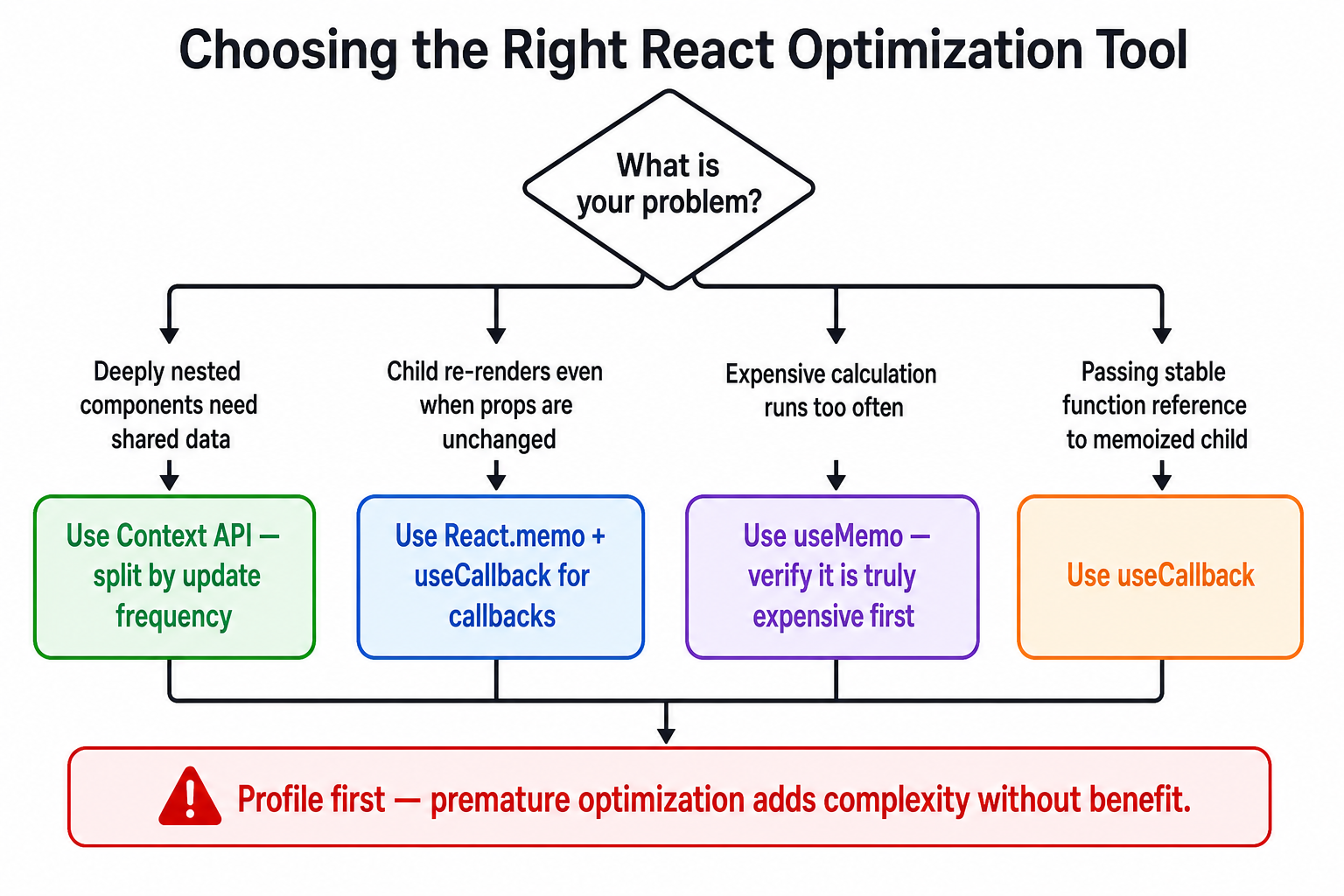
| Tool | When it helps | When it hurts | Cost |
|---|---|---|---|
| Context API | Low-frequency global state | High-frequency updates (form, scroll) | Couples consumers to provider shape |
| React.memo | Stable-props child of frequently-updating parent | When props change on almost every render | Shallow comparison overhead + code complexity |
| useMemo | Genuinely expensive computations | Cheap operations (summing 5 numbers) | Memory + comparison cost every render |
| useCallback | Passing callbacks to memoized children | Callbacks not passed to children | Memory + comparison cost every render |
The Premature Optimization Tax
Every call to useMemo and useCallback has a cost: React must store the cached value, store the dependency array, and compare dependencies on every render. For cheap operations, this cost exceeds the cost of simply recomputing the value.
Do not memoize:
String concatenations
Simple arithmetic
Callbacks that are not passed to
React.memo-wrapped childrenComponents that render infrequently regardless
Warning: Wrapping every function in
useCallbackand every value inuseMemois a common mistake. Measure first. React DevTools Profiler and the browser's Performance tab are your primary tools. Optimize the renders that show up hot, not the ones you assume might be slow.
Context Causes All Consumers to Re-render
When a Context value changes, every component consuming that context re-renders. If your context bundles together fast-changing state with slow-changing state, you are paying for unnecessary renders across the board.
The solution is context splitting:
// ❌ One big context — a username update re-renders ALL consumers including theme consumers
const AppContext = createContext({ user, theme, notifications });

// ✅ Separate contexts — each updates independently
const UserContext = createContext(user);
const ThemeContext = createContext(theme);
const NotificationContext = createContext(notifications);
Part 10 — Best Practices
Start without optimization. Write clear, simple code first. Measure performance. Optimize only what the profiler identifies as hot.
Co-locate state. Keep state as close to the components that use it as possible. Lift only when siblings genuinely need to share it.
Use custom hooks to encapsulate context logic. The
useAuth()/useUser()pattern hides the context internals and throws a helpful error when used outside the provider.Memoize Context Provider values. If your Provider component ever re-renders (e.g., it receives children as a prop), ensure the
valueobject is wrapped inuseMemoand callbacks inuseCallback.Split contexts by update frequency. Group data that changes together. Never bundle a high-frequency value with a low-frequency one in the same context.
Don't memo-ize components at the source — memo-ize at the boundary.
React.memois most valuable at the boundary between a frequently-updating parent and a stable child, not applied uniformly everywhere.Profile before and after. Use the React DevTools Profiler's "Record" feature to measure render counts and durations. A 16ms render budget equates to 60fps — optimize renders that exceed it.
Treat performance problems as architectural signals. If you find yourself wrapping dozens of components in
React.memo, the real problem is likely that state is living too high in the tree. Moving that state down is a more durable fix.

Conclusion
The tools React ships with — the Context API, React.memo, useMemo, and useCallback — form a coherent, powerful system when you understand what problem each one solves:
Prop drilling is an architecture problem. Fix it by lifting state to the right level and broadcasting it through context.
Context API is for global, low-frequency state. Keep contexts small, focused, and split by update frequency.
React.memo stops unnecessary child re-renders when parent state changes — but only if the props are referentially stable.
useCallback gives functions stable references across renders, making
React.memoactually work for components that receive callbacks.useMemo caches expensive computed values, and also stabilizes object references passed to Context or memoized children.
The most important insight is this: most React performance problems are architectural, not technical. State living too high in the tree, contexts that bundle unrelated data, components that own more state than they should — these are design problems that no amount of useMemo fully papers over. Reach for the optimization tools only after the architecture is clean.
Further Reading
React Docs — Passing Data Deeply with Context — The official guide, now with excellent interactive examples.
React Docs — useMemo — Covers the nuanced "should you add useMemo everywhere" question directly.
React Docs — useCallback — Includes a detailed walkthrough of the referential equality problem.
React DevTools Profiler — The correct starting point before any performance optimization work.
Before You memo() — Dan Abramov — Essential reading on architectural solutions that make memoization unnecessary.