TL;DR: Realtime communication is not one technology — it’s a spectrum of patterns, each with distinct trade-offs in latency, scalability, and complexity. This article walks through every major approach with real code, honest comparisons, and practical guidance on choosing the right tool for your system.
Introduction
When you send a WhatsApp message, it appears on the recipient’s screen in under a second — often before you’ve even put your phone down. How does that happen? The recipient’s app didn’t ask for your message. It received it. That single distinction — the difference between a client asking for data and a server delivering it unprompted — is the core challenge of realtime systems.
Building features that feel instant is harder than it looks. The web’s foundational protocol, HTTP, was designed for a world of documents: a client asks, a server answers, and the connection closes. That model is elegant for fetching a blog post, but it breaks down the moment you need a live dashboard, a collaborative document, or a ride-tracking map that updates every two seconds.
This article is written for developers who understand HTTP and have built REST APIs, and who now need to add realtime capabilities to a real application. We’ll move progressively from the simplest approach to the most powerful, building intuition at each step.
What Makes a System “Realtime”?
The word “realtime” is overloaded. In embedded systems and avionics, it has a strict meaning: deterministic response within a guaranteed deadline. In software engineering, we use it more loosely to mean the user perceives updates as they happen.
A useful distinction:
- Hard realtime: Response must arrive within a strict deadline (e.g., 50ms). Missing it causes system failure. (Autopilots, pacemakers.)
- Soft realtime: Latency should be low, but occasional delays are tolerable. (Stock tickers, live sports scores.)
- Near-realtime: Data is delivered within seconds or minutes, not instantly. (Analytics pipelines, batch notifications.)
Most web applications need soft realtime. Users expect chat messages in under a second, dashboard metrics to update within a few seconds, and notifications to appear within moments of an event occurring. Meeting these expectations requires rethinking the default request-response model.
Common realtime use cases and their latency budgets:
| Use Case | Acceptable Latency | Direction |
|---|---|---|
| Chat messaging | < 200ms | Bidirectional |
| Collaborative editing | < 100ms | Bidirectional |
| Live sports scores | 1–3s | Server → Client |
| Ride tracking | 1–2s | Server → Client |
| System monitoring dashboard | 2–5s | Server → Client |
| Push notifications | 1–10s | Server → Client |
| IoT sensor data | Varies | Bidirectional |
Notice that many realtime use cases are unidirectional: the server pushes data to the client, but the client doesn’t need to send data back (beyond an initial subscription request). This matters when choosing a pattern.
Traditional Request-Response Communication
Before jumping to solutions, it’s worth understanding exactly why the default model fails.
HTTP is a request-response protocol. A client (browser, mobile app) initiates a connection, sends a request, waits for a response, and the connection closes. Even with HTTP/1.1 keep-alive or HTTP/2 multiplexing, the fundamental model remains: the client must ask first.
sequenceDiagram
    participant Client
    participant Server
    Client->>Server: GET /api/messages
    Server-->>Client: 200 OK { messages: [...] }
    Note over Client,Server: Connection closes. Server cannot initiate contact.
    Client->>Server: GET /api/messages (again, 5s later)
    Server-->>Client: 200 OK { messages: [...] }
For a chat application, this means a user won’t see a new message until their client happens to ask for it. The server knows there’s a new message the moment it arrives, but it has no way to tell the client. This is the fundamental problem.
Polling: The Blunt Instrument
How It Works
Polling is the simplest solution: the client asks the server for updates on a fixed interval. If new data exists, it gets it. If not, the server returns an empty response.
// Client-side polling — asking every 3 seconds
function startPolling(conversationId) {
  let lastMessageId = null;

  setInterval(async () => {
    const url = lastMessageId
      ? `/api/conversations/\({conversationId}/messages?after=\){lastMessageId}`
      : `/api/conversations/${conversationId}/messages`;

    const response = await fetch(url);
    const data = await response.json();

    if (data.messages.length > 0) {
      renderMessages(data.messages);
      lastMessageId = data.messages.at(-1).id;
    }
  }, 3000); // poll every 3 seconds
}
The server endpoint looks like any standard REST endpoint — no special handling needed:
# FastAPI server — standard endpoint, nothing realtime about it
from fastapi import FastAPI, Query
from typing import Optional

app = FastAPI()

@app.get("/api/conversations/{conversation_id}/messages")
async def get_messages(
    conversation_id: str,
    after: Optional[str] = Query(None)
):
    messages = await db.get_messages(
        conversation_id=conversation_id,
        after_id=after
    )
    return {"messages": messages}
The Real Cost of Polling
Polling feels simple, and it is — but it has a brutal resource profile. Consider 10,000 active users polling every 3 seconds. That’s 3,333 HTTP requests per second hitting your server, the vast majority of which return empty responses. You’re paying the full cost of an HTTP connection (TLS handshake, headers, routing) for data that usually doesn’t exist.
At low scale (hundreds of users, infrequent updates), polling is perfectly acceptable and easy to reason about. At high scale, or with low latency requirements, it becomes untenable.
When polling is the right choice:
- Prototype or internal tool where scale doesn’t matter
- Update frequency matches your poll interval (e.g., a report that regenerates every 5 minutes)
- You can’t modify the server (polling a third-party API)
- The operational simplicity is worth the resource cost
Warning: Never set a polling interval shorter than your average server response time. If responses take 500ms and you poll every 200ms, you’ll have overlapping in-flight requests and an ever-growing backlog.
Long Polling: Holding the Line
Long polling is a clever hack that inverts the timing of a regular poll. Instead of the server immediately responding with “nothing new,” it holds the connection open until new data arrives (or a timeout expires).
sequenceDiagram
    participant Client
    participant Server
    Client->>Server: GET /messages?after=123 (long poll)
    Note over Server: No new messages... waiting...
    Note over Server: New message arrives!
    Server-->>Client: 200 OK { messages: [new_message] }
    Client->>Server: GET /messages?after=456 (immediately reconnect)
    Note over Server: Waiting again...
    Server-->>Client: 200 OK { messages: [...] } or 204 (timeout)
The server-side implementation requires holding responses suspended, typically using async I/O:
import asyncio
from fastapi import FastAPI
from fastapi.responses import JSONResponse

app = FastAPI()

# Simplified in-memory pub/sub for demo purposes
message_queues: dict[str, asyncio.Queue] = {}

@app.get("/api/conversations/{conversation_id}/long-poll")
async def long_poll_messages(
    conversation_id: str,
    after: str,
    timeout: int = 30
):
    # Check if there are already new messages
    new_messages = await db.get_messages_after(conversation_id, after)
    if new_messages:
        return {"messages": new_messages}

    # No new messages — hold the connection open
    queue = message_queues.setdefault(conversation_id, asyncio.Queue())
    try:
        # Wait up to `timeout` seconds for a new message
        message = await asyncio.wait_for(queue.get(), timeout=timeout)
        return {"messages": [message]}
    except asyncio.TimeoutError:
        # Return empty after timeout — client will reconnect
        return JSONResponse(status_code=204, content=None)
The client reconnects immediately after each response:
async function longPoll(conversationId, lastMessageId) {
  while (true) {
    try {
      const response = await fetch(
        `/api/conversations/\({conversationId}/long-poll?after=\){lastMessageId}`,
        { signal: AbortSignal.timeout(35_000) } // slightly longer than server timeout
      );

      if (response.status === 200) {
        const data = await response.json();
        renderMessages(data.messages);
        lastMessageId = data.messages.at(-1).id;
      }
      // 204 means timeout, just reconnect immediately
    } catch (err) {
      // Network error — back off before retrying
      await sleep(2000);
    }
  }
}
Long polling dramatically reduces the number of wasted round trips. In the best case (frequent messages), it approaches true push. In the worst case (rare messages), it’s just polling with a longer interval.
Note: Long polling requires your server to support many concurrent open connections efficiently. A traditional threaded server (one thread per connection) will exhaust threads quickly. Node.js, Go, or async Python (FastAPI/aiohttp) handle this well because they use non-blocking I/O and don’t dedicate a thread per connection.
Server-Sent Events (SSE): The Elegant One-Way Stream
SSE is an official W3C standard (part of HTML5) that formalizes a simple idea: keep an HTTP response open and stream newline-delimited text events down it forever.
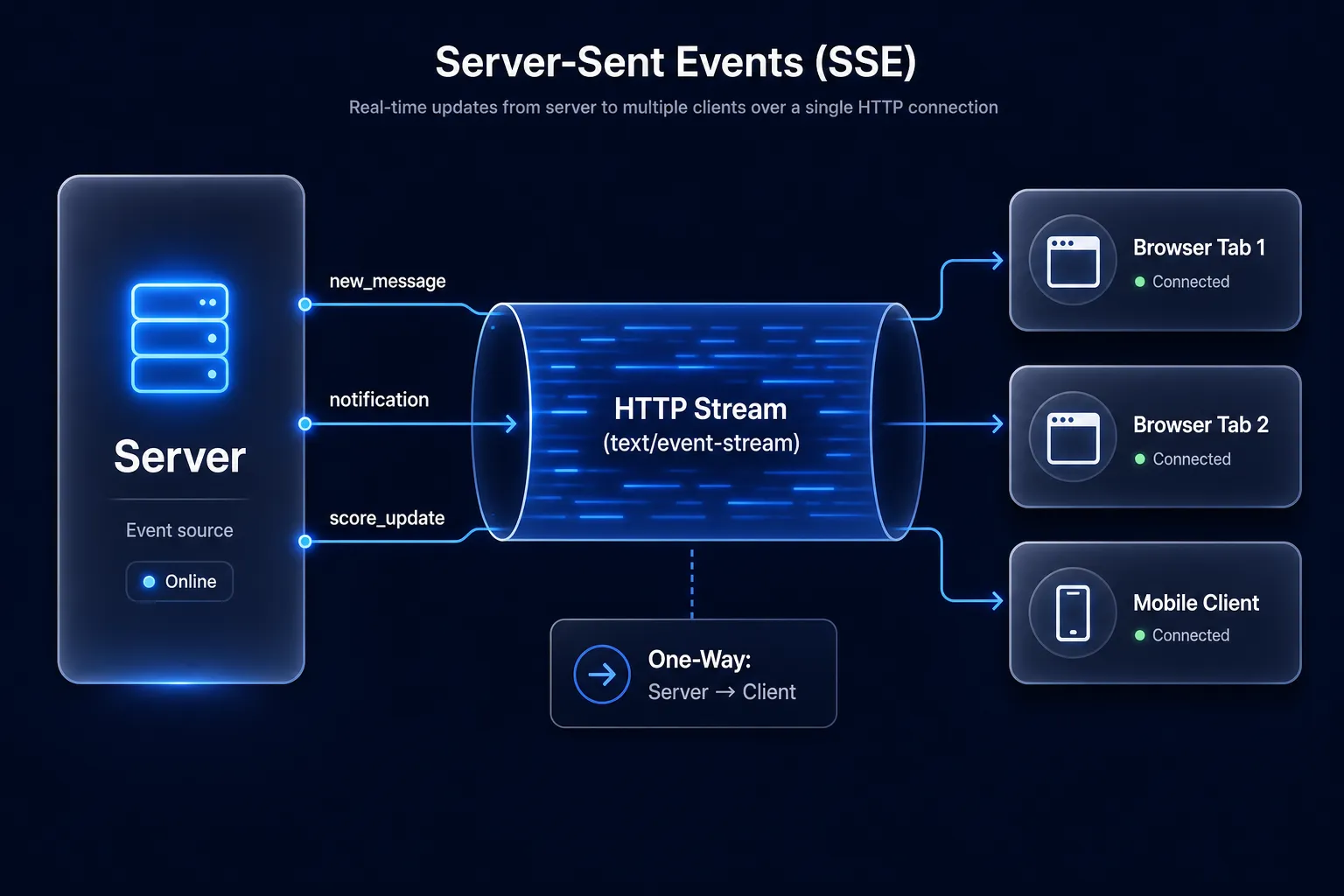
Unlike WebSockets, SSE runs over plain HTTP. The server sends a special Content-Type: text/event-stream header, and the browser’s built-in EventSource API handles reconnection, parsing, and event dispatching automatically.
Server Implementation
import asyncio
from fastapi import FastAPI
from fastapi.responses import StreamingResponse
from typing import AsyncGenerator

app = FastAPI()

async def event_stream(
    user_id: str
) -> AsyncGenerator[str, None]:
    """Yields SSE-formatted strings for a given user."""
    queue = subscribe_to_user_events(user_id)
    try:
        while True:
            event = await queue.get()
            # SSE format: field: value, separated by \n, terminated by \n\n
            yield f"id: {event['id']}\n"
            yield f"event: {event['type']}\n"
            yield f"data: {json.dumps(event['payload'])}\n\n"
    except asyncio.CancelledError:
        unsubscribe_from_user_events(user_id, queue)

@app.get("/api/events/stream")
async def stream_events(user_id: str):
    return StreamingResponse(
        event_stream(user_id),
        media_type="text/event-stream",
        headers={
            "Cache-Control": "no-cache",
            "X-Accel-Buffering": "no",  # Disable Nginx buffering
        }
    )
Client Implementation
// The EventSource API is built into every modern browser
const eventSource = new EventSource('/api/events/stream?user_id=u_abc123');

eventSource.addEventListener('new_message', (event) => {
  const message = JSON.parse(event.data);
  renderNewMessage(message);
});

eventSource.addEventListener('notification', (event) => {
  const notification = JSON.parse(event.data);
  showNotification(notification);
});

// The EventSource reconnects automatically on disconnection
eventSource.onerror = (err) => {
  console.warn('SSE connection lost, browser will retry automatically');
};
The SSE format is beautifully simple. An event with an ID (for reconnection), a type, and a JSON payload:
id: evt_001
event: new_message
data: {"from": "alice", "text": "Hey, are you free?", "timestamp": 1714000000}
When the client reconnects after a dropout, it sends a Last-Event-ID header with the last event ID it received. Your server can use this to replay missed events — a built-in reliability mechanism.
SSE limitations to know:
- One-way only. The client cannot send data over the SSE connection. For bidirectional needs, pair it with regular POST requests.
- HTTP/1.1 browser connection limit. Browsers cap concurrent connections per domain at 6 for HTTP/1.1. If a user opens your app in multiple tabs, each tab opens an SSE connection, potentially hitting this limit. HTTP/2 eliminates this problem with multiplexing.
- No binary support. SSE is text-only. Fine for JSON, awkward for binary data.
WebSockets: Full-Duplex Over a Single Connection
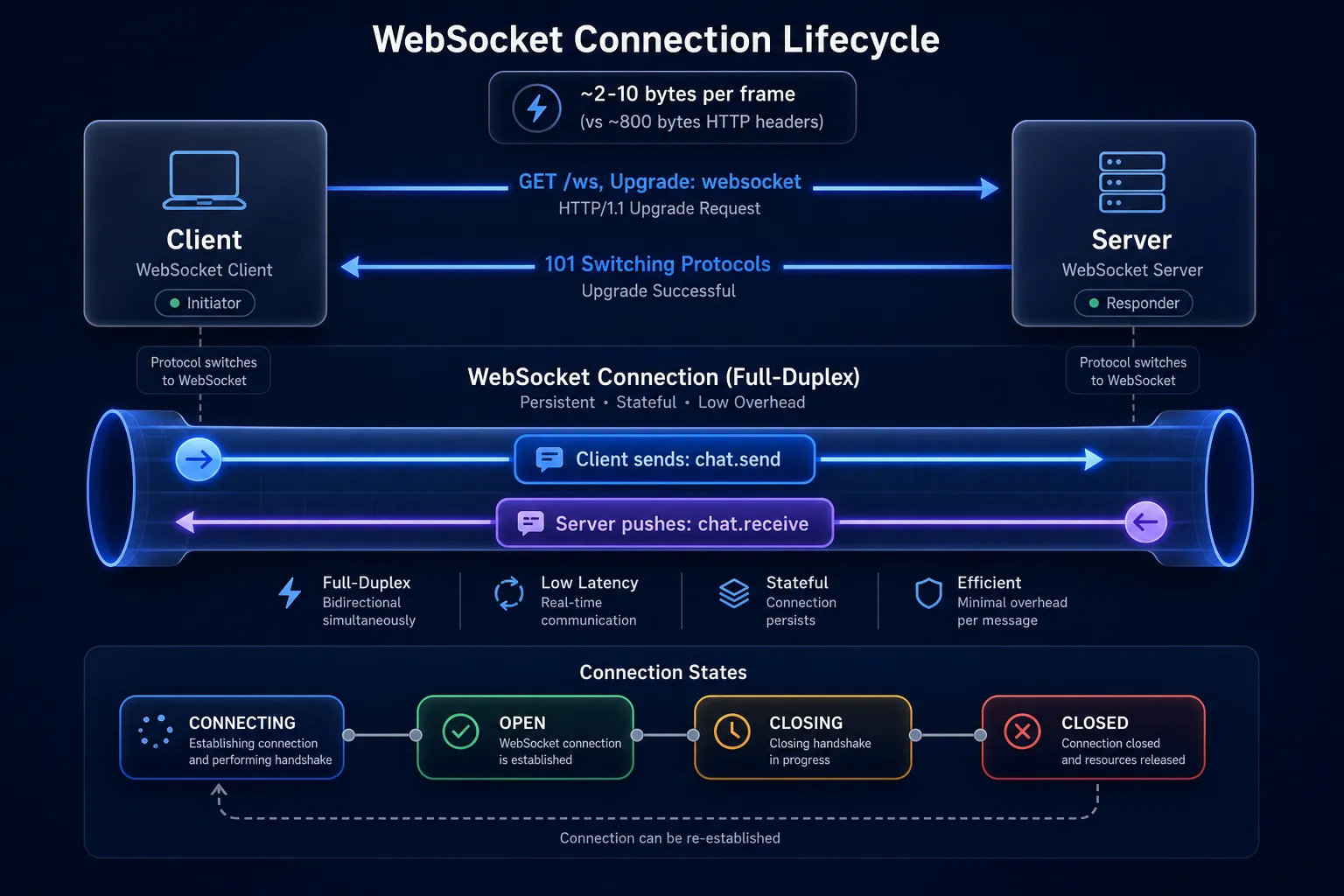
WebSockets solve the bidirectionality problem entirely. A WebSocket connection starts as an HTTP request (the “upgrade handshake”) and then promotes to a persistent, full-duplex TCP connection. Once established, either side can send data at any time with minimal overhead — no HTTP headers on every message.
The Upgrade Handshake
# Client sends:
GET /ws/chat HTTP/1.1
Host: api.example.com
Upgrade: websocket
Connection: Upgrade
Sec-WebSocket-Key: dGhlIHNhbXBsZSBub25jZQ==
Sec-WebSocket-Version: 13

# Server responds:
HTTP/1.1 101 Switching Protocols
Upgrade: websocket
Connection: Upgrade
Sec-WebSocket-Accept: s3pPLMBiTxaQ9kYGzzhZRbK+xOo=
After this exchange, the HTTP connection becomes a WebSocket connection. The overhead per message drops from ~800 bytes (HTTP headers) to as little as 2–10 bytes (WebSocket framing).
Server Implementation (Node.js with ws)
import { WebSocketServer } from 'ws';
import http from 'http';

const server = http.createServer();
const wss = new WebSocketServer({ server });

// Map of userId -> WebSocket connection
const connections = new Map();

wss.on('connection', (ws, request) => {
  const userId = authenticateUser(request);
  if (!userId) {
    ws.close(1008, 'Unauthorized');
    return;
  }

  connections.set(userId, ws);
  console.log(`User \({userId} connected. Total: \){connections.size}`);

  ws.on('message', async (rawData) => {
    const message = JSON.parse(rawData.toString());

    switch (message.type) {
      case 'chat.send': {
        const saved = await db.saveMessage({
          from: userId,
          to: message.to,
          text: message.text,
        });

        // Deliver to recipient if online
        const recipientWs = connections.get(message.to);
        if (recipientWs?.readyState === WebSocket.OPEN) {
          recipientWs.send(JSON.stringify({
            type: 'chat.receive',
            message: saved,
          }));
        }

        // Confirm delivery to sender
        ws.send(JSON.stringify({
          type: 'chat.sent',
          messageId: saved.id,
        }));
        break;
      }

      case 'typing.start':
      case 'typing.stop': {
        const recipientWs = connections.get(message.to);
        recipientWs?.send(JSON.stringify({
          type: message.type,
          from: userId,
        }));
        break;
      }
    }
  });

  ws.on('close', (code, reason) => {
    connections.delete(userId);
    console.log(`User \({userId} disconnected: \){code} ${reason}`);
  });

  ws.on('error', (err) => {
    console.error(`WebSocket error for ${userId}:`, err);
    connections.delete(userId);
  });
});

server.listen(8080, () => console.log('WebSocket server on :8080'));
Client Implementation
class ChatClient {
  constructor(serverUrl) {
    this.serverUrl = serverUrl;
    this.ws = null;
    this.reconnectDelay = 1000;
    this.connect();
  }

  connect() {
    this.ws = new WebSocket(this.serverUrl);

    this.ws.onopen = () => {
      console.log('Connected');
      this.reconnectDelay = 1000; // reset backoff on success
    };

    this.ws.onmessage = (event) => {
      const message = JSON.parse(event.data);
      this.handleMessage(message);
    };

    this.ws.onclose = () => {
      // Exponential backoff reconnection
      setTimeout(() => this.connect(), this.reconnectDelay);
      this.reconnectDelay = Math.min(this.reconnectDelay * 2, 30_000);
    };
  }

  sendMessage(toUserId, text) {
    this.ws.send(JSON.stringify({
      type: 'chat.send',
      to: toUserId,
      text,
    }));
  }

  handleMessage(message) {
    switch (message.type) {
      case 'chat.receive': renderIncomingMessage(message.message); break;
      case 'typing.start': showTypingIndicator(message.from); break;
      case 'typing.stop': hideTypingIndicator(message.from); break;
    }
  }
}

const chat = new ChatClient('wss://api.example.com/ws/chat');
Tip: Always implement exponential backoff with jitter on WebSocket reconnection. If your server restarts and 50,000 clients all reconnect simultaneously, you get a thundering herd that can bring the server back down. Add
Math.random() * 1000jitter to the delay.
Pub/Sub Systems: Decoupling at Scale
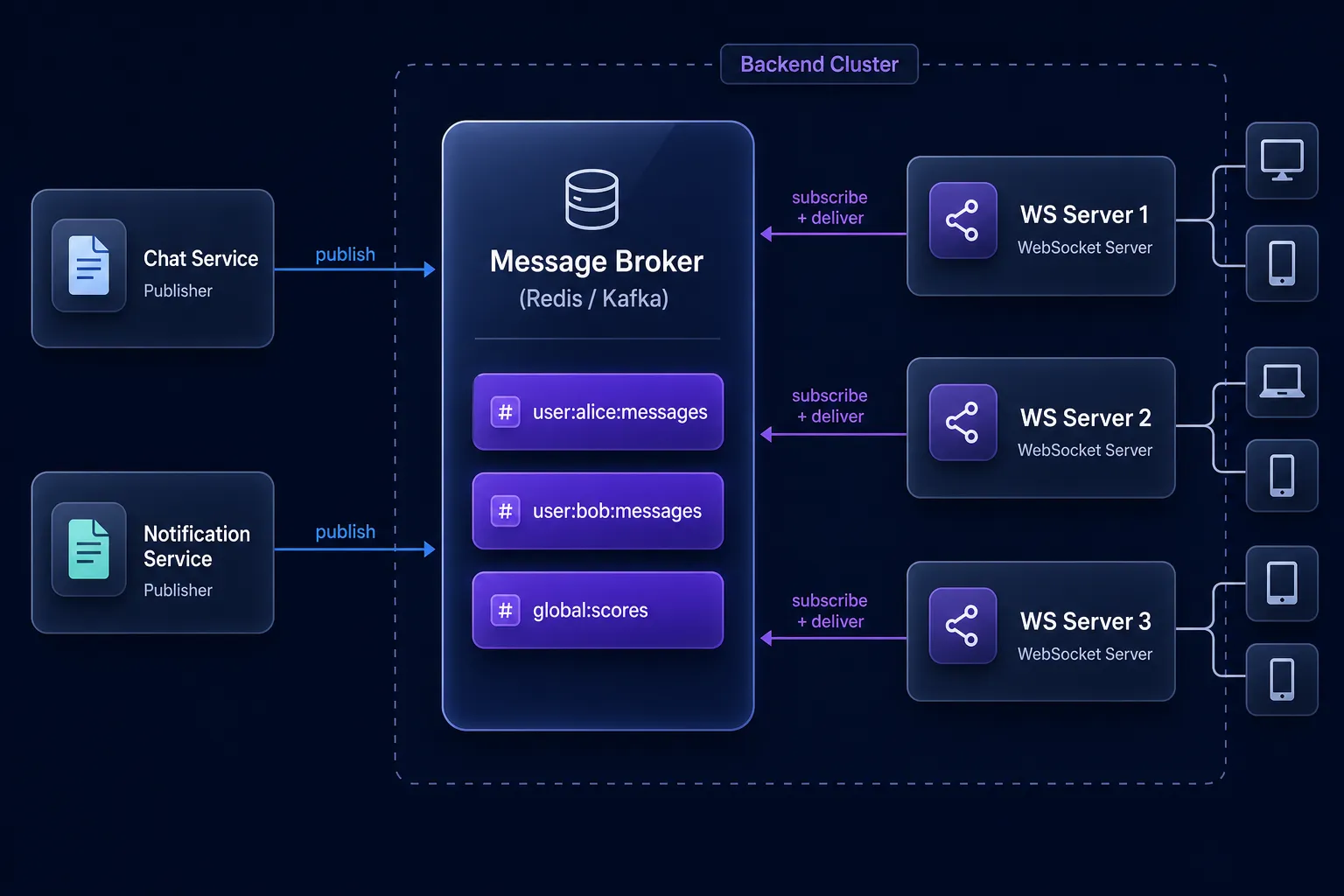
Polling, SSE, and WebSockets are all protocols — they describe how data moves between a client and a server. Pub/Sub is an architectural pattern that describes how data moves between services and to clients at scale.
In a Pub/Sub system, publishers emit events to named topics (or channels) without knowing who will receive them. Subscribers express interest in topics and receive events routed to them. A message broker (Redis Pub/Sub, Kafka, NATS, Google Pub/Sub) sits in the middle.
Why Pub/Sub Becomes Necessary
Consider a chat application running on 10 servers. User Alice connects to Server 1. User Bob connects to Server 7. When Alice sends a message to Bob, it arrives at Server 1. But Bob’s WebSocket connection is on Server 7. Server 1 has no way to reach Bob directly.
The solution: when a message arrives, Server 1 publishes it to a shared Pub/Sub broker. All 10 servers subscribe to messages for their connected users. Server 7 receives the event from the broker and forwards it over Bob’s WebSocket.
import { createClient } from 'redis';

const publisher = createClient({ url: 'redis://redis:6379' });
const subscriber = createClient({ url: 'redis://redis:6379' });

await publisher.connect();
await subscriber.connect();

// When Server 1 receives Alice's message:
async function handleOutgoingMessage(fromUserId, toUserId, text) {
  const message = await db.saveMessage({ fromUserId, toUserId, text });

  // Publish to a user-specific channel — any server listening will pick it up
  await publisher.publish(
    `user:${toUserId}:messages`,
    JSON.stringify({ type: 'chat.receive', message })
  );
}

// On every server — subscribe to channels for locally-connected users
function subscribeForUser(userId, ws) {
  subscriber.subscribe(`user:${userId}:messages`, (payload) => {
    const event = JSON.parse(payload);
    if (ws.readyState === WebSocket.OPEN) {
      ws.send(JSON.stringify(event));
    }
  });
}

// When a user connects to this server:
wss.on('connection', (ws, request) => {
  const userId = authenticateUser(request);
  subscribeForUser(userId, ws);
  // ...
});
This pattern is why Redis is used as a WebSocket adapter in almost every scaled Socket.IO deployment. The WebSocket layer handles client connections; the Pub/Sub layer handles cross-server delivery.
For higher throughput and durability requirements (where losing messages is unacceptable), Kafka is a common choice. Kafka persists messages to disk, supports consumer groups, and can replay event streams — at the cost of higher operational complexity.
Comparing All Approaches
| Approach | Latency | Direction | Protocol | Scalability | Complexity | Best For |
|---|---|---|---|---|---|---|
| Polling | High (interval-bound) | Client → Server | HTTP | Low | Low | Infrequent updates, simple systems |
| Long Polling | Medium | Client → Server | HTTP | Medium | Medium | Low-frequency push, broad compatibility |
| SSE | Low | Server → Client | HTTP | High (with HTTP/2) | Low | Notifications, dashboards, feeds |
| WebSockets | Very Low | Bidirectional | WS/WSS | Medium (needs sticky sessions or Pub/Sub) | Medium | Chat, collaborative editing, gaming |
| Pub/Sub | Low (async) | Decoupled | Varies | Very High | High | Multi-server delivery, event-driven arch |
Latency Comparison (Practical Numbers)
In a real chat application measured under moderate load:
- Polling (3s interval): Average message delivery latency = ~1500ms
- Long Polling: Average = ~80ms (near-instant for active conversations)
- SSE: Average = ~15ms
- WebSocket: Average = ~5ms
The raw numbers favor WebSockets, but latency is rarely the binding constraint. Operational complexity, infrastructure, and the actual UX requirement usually decide the winner.
Building Realtime Systems at Scale
Connecting 1,000 users over WebSockets on a single server is straightforward. Connecting 1,000,000 is a different engineering problem.
The Sticky Session Problem
WebSocket connections are stateful — a user’s connection lives on a specific server process. When you add a second server, you need a load balancer that routes all requests from the same user to the same server (sticky sessions). This works, but it complicates deployments, rolling restarts, and autoscaling.
Alternative: make WebSocket servers stateless using Pub/Sub for routing (as shown above) and store presence information (which users are online, on which server) in a shared Redis cluster.
Heartbeating and Dead Connection Detection
TCP connections can go silent without a clean close — a user’s laptop lid closes, a mobile network changes, a NAT table entry expires. The server may hold a “ghost” connection for minutes before detecting the client is gone.
Implement application-level heartbeats (ping/pong frames):
// Server-side: send a ping every 30s, close if no pong within 10s
function setupHeartbeat(ws) {
  let isAlive = true;

  ws.on('pong', () => { isAlive = true; });

  const interval = setInterval(() => {
    if (!isAlive) {
      ws.terminate();
      return clearInterval(interval);
    }
    isAlive = false;
    ws.ping();
  }, 30_000);

  ws.on('close', () => clearInterval(interval));
}
Message Delivery Guarantees
WebSockets and SSE give you at-most-once delivery by default: if the connection drops while a message is in flight, it’s lost. For chat, this is unacceptable.
Build at-least-once delivery:
- Assign every message a unique, monotonically increasing sequence number per conversation.
- The client tracks the highest sequence number it has confirmed.
- On reconnection, the client sends its last confirmed sequence number; the server replays everything after it.
- Use SSE’s
Last-Event-IDheader for this out of the box.
Choosing the Right Approach
Here’s a decision framework, not a dogma:
Chat application (WhatsApp, Slack clone): WebSockets + Pub/Sub backend. You need bidirectional, low-latency communication with cross-server delivery.
Notification system (email/push-style in-app notifications): SSE is ideal. Notifications flow server → client, SSE handles reconnection automatically, and it works over plain HTTP. Pair with regular HTTP POST for actions.
Live sports scores / stock tickers: SSE or polling (if 10-second intervals are acceptable). Scores update server → client at moderate frequency. SSE is clean and efficient here.
Collaborative editing (Google Docs-style): WebSockets. You need sub-100ms bidirectional sync and operational transformation or CRDT conflict resolution.
IoT sensor data ingestion: Pub/Sub (MQTT or Kafka). Devices publish to topics; backend services consume. Browser dashboard subscribes to a WebSocket or SSE stream from an aggregation service.
System monitoring dashboard: Polling (if 10–30s is fine) or SSE (if you want 1–2s granularity). Almost never worth the complexity of WebSockets for one-way metric delivery.
Warning: Don’t default to WebSockets because they feel “modern” or “powerful.” They introduce connection management complexity, require infrastructure changes (sticky sessions or Pub/Sub), and add operational burden. If your data flow is server → client and SSE meets your latency budget, use SSE.
Best Practices
1. Design for reconnection from day one. Every realtime transport will disconnect. Clients must handle this gracefully with backoff, replay, and state reconciliation.
2. Use message sequence numbers. Don’t rely on delivery order from the transport. Assign and validate sequence numbers at the application layer.
3. Separate your transport from your business logic. The code that handles WebSocket events should delegate immediately to service functions — don’t put business logic in ws.on('message') handlers.
4. Monitor connection counts, not just request rates. Realtime servers have a different operational profile. Track active connections, reconnection rates, and message queue depth.
5. Put a CDN/proxy in front. Cloudflare, Fastly, and AWS CloudFront all support WebSocket and SSE proxying. This gives you DDoS protection and can absorb connection overhead at the edge.
6. Test at scale with simulated clients. Use tools like k6 (which supports WebSocket scripting) or artillery to simulate thousands of concurrent connections before you hit production.
# k6 WebSocket load test (k6-script.yaml concept)
# Run: k6 run ws-test.js
// k6 WebSocket load test
import { WebSocket } from 'k6/experimental/websockets';
import { check, sleep } from 'k6';
export const options = {
vus: 500, // 500 concurrent virtual users
duration: '60s',
};
export default function () {
const ws = new WebSocket('wss://api.example.com/ws/chat');
ws.onopen = () => {
ws.send(JSON.stringify({ type: 'auth', token: __ENV.WS_TOKEN }));
};
ws.onmessage = (event) => {
const msg = JSON.parse(event.data);
check(msg, { 'received message': (m) => m.type !== undefined });
};
sleep(30); // hold connection open for 30 seconds
ws.close();
}Conclusion
Building realtime systems is fundamentally about choosing the right communication pattern for your latency budget, traffic direction, and scale requirements. The progression from polling to long polling to SSE to WebSockets isn’t a history of obsolescence — each technique remains the correct choice in specific contexts.
Key takeaways:
- Polling is simple and appropriate when intervals match update frequency.
- Long polling approaches push behavior without protocol changes, at the cost of server-side connection holding.
- SSE is the underrated workhorse for server-to-client streams — use it whenever you don’t need bidirectional communication.
- WebSockets deliver the lowest latency and full bidirectionality, but require more infrastructure thought.
- Pub/Sub is not a client-facing protocol but an architectural pattern that makes all of the above horizontally scalable.
Your immediate next step: Pick one existing feature in your application that users currently reload to see updates. Identify whether the data flow is unidirectional or bidirectional, then implement SSE or WebSockets accordingly. Start with a single feature — the patterns are learnable through building.
Further Reading
- MDN: Using Server-Sent Events — The canonical reference for the SSE API and event stream format.
- RFC 6455: The WebSocket Protocol — The spec itself, surprisingly readable and explaining the design rationale.
- Redis Pub/Sub Documentation — How Redis implements the Pub/Sub pattern, with commands and patterns.
- Socket.IO Docs: Adapter — Shows how Socket.IO solves the multi-server problem using Redis Pub/Sub under the hood.
- k6 WebSocket Testing Guide — Load testing realtime connections before production.