
TL;DR: React gives you the tools to build UIs, but not a complete application. Next.js fills that gap with file-based routing, multiple rendering strategies, Server Components, and production-grade performance defaults — which is why most teams building serious React applications reach for it by default.
Introduction
If React is so popular, why was Next.js created?
That question gets to the heart of a distinction that confuses many developers early in their careers: the difference between a library and a framework. React is a UI library. It renders components to the DOM. It manages state. It handles events. What it does not do is tell you how to route between pages, how to fetch data efficiently, how to optimize for search engines, or how to structure a large application for long-term maintainability.
When developers started building serious production applications with React alone, they ran into a predictable set of problems. The JavaScript bundle grew large. Search engines couldn’t index content reliably. Initial page loads were slow. Routing required third-party libraries and significant manual configuration. Every team ended up reinventing the same wheel differently.
Next.js emerged to solve exactly these problems — and it did so well enough that Vercel, Meta, and the broader React community have effectively endorsed it as the recommended way to build React applications at scale.
This article is written for developers who know React basics and want to understand why Next.js exists, what it adds, and when it makes sense to use it versus sticking with a plain React setup.
The Problems With React-Only Applications
To understand Next.js, you first need to feel the pain it was built to eliminate.
Client-Side Rendering and Its Costs
A vanilla React application uses Client-Side Rendering (CSR). The server sends a nearly empty HTML file — essentially just a <div id="root"></div> — and a JavaScript bundle. The browser downloads the bundle, parses it, executes it, fetches data, and then renders the UI. Until all of that is done, the user sees a blank screen or a loading spinner.
On a fast connection with a small app, this is imperceptible. On a mobile device with a 3G connection loading a 500KB+ JavaScript bundle, users wait 3–5 seconds before seeing anything meaningful. Google’s Core Web Vitals measure this as Largest Contentful Paint (LCP) — and CSR React apps consistently perform poorly on it.
The SEO Problem
Search engine crawlers have traditionally been poor at executing JavaScript. Even Googlebot, which can run JavaScript, indexes JS-rendered pages in a secondary wave that can take days. For marketing sites, blogs, or e-commerce pages where organic search traffic matters, shipping an empty HTML file to crawlers is a serious competitive disadvantage.
No Conventions, Infinite Decisions
React gives you no opinion on routing, data fetching, code splitting, or folder structure. That freedom is a strength for library authors and embedded UI work, but it’s a liability when building a full application. Every team answers the same questions differently:
- Do we use React Router or TanStack Router?
- Do we use
useEffectfor data fetching or React Query or SWR? - How do we split code so we don’t send everything to the browser at once?
- Where do we put our API logic?
This decision fatigue slows teams down and produces inconsistent codebases.
React vs. Next.js: What Each One Actually Does
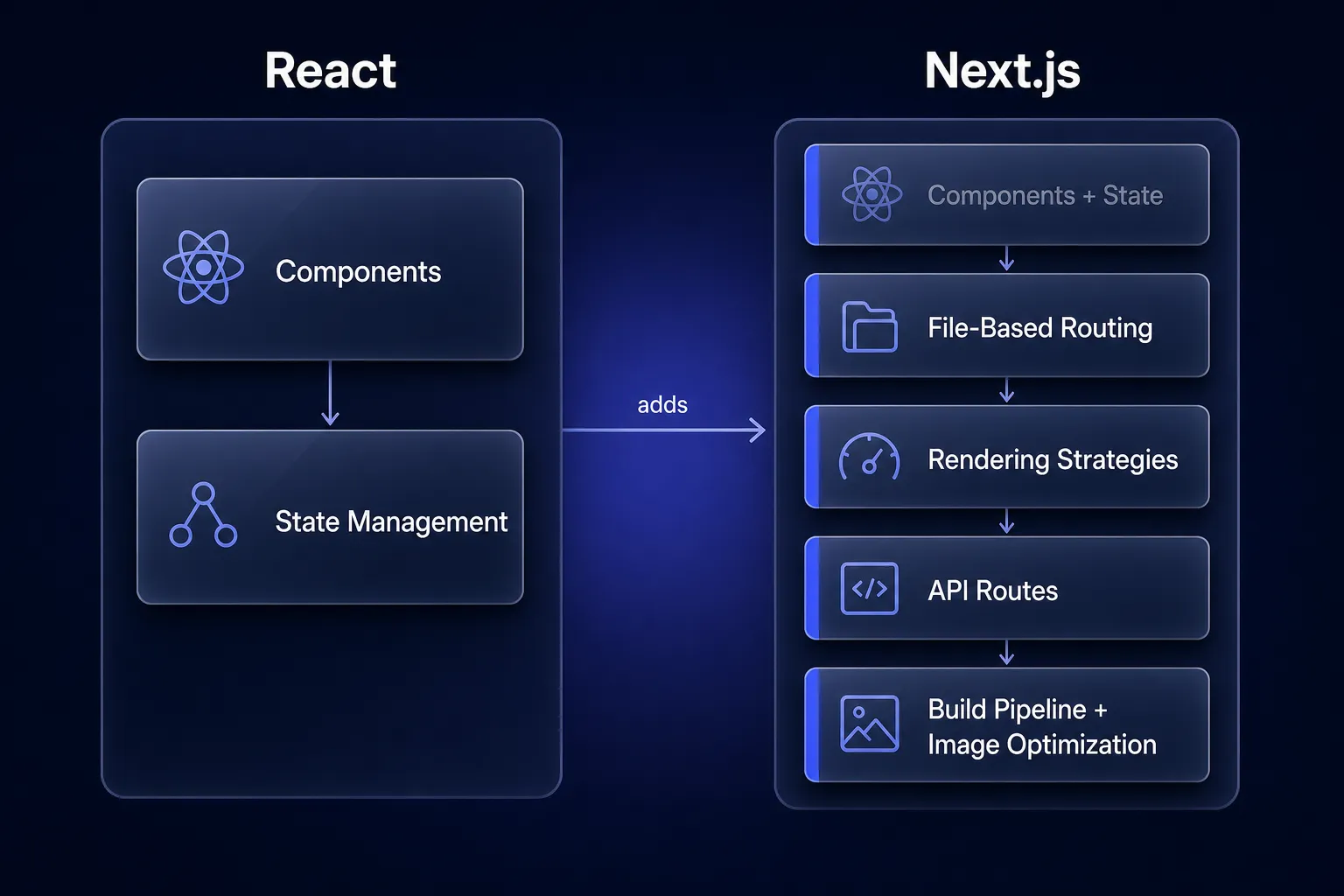
The distinction is not that Next.js replaces React — it includes React and builds a full application framework on top of it.
| Capability | React (alone) | Next.js |
|---|---|---|
| Component model | ✅ Yes | ✅ Yes (via React) |
| State management | ✅ Yes | ✅ Yes (via React) |
| Routing | ❌ Not included | ✅ File-based, built-in |
| Server-Side Rendering | ❌ Manual setup | ✅ Built-in |
| Static Site Generation | ❌ Not supported | ✅ Built-in |
| API routes / backend logic | ❌ Not included | ✅ Built-in |
| Image optimization | ❌ Not included | ✅ <Image> component |
| Code splitting | ⚠️ Manual | ✅ Automatic per route |
| TypeScript support | ⚠️ Manual config | ✅ Zero-config |
| Production build pipeline | ⚠️ Manual (Webpack/Vite) | ✅ Managed by Next.js |
This table illustrates why Next.js feels more like a platform than a library addition. It makes real architectural decisions on your behalf — and those decisions are well-researched defaults that match what most production applications need.
Understanding Rendering Strategies
One of Next.js’s most significant contributions to the React ecosystem is giving developers a menu of rendering strategies, each suited to different use cases. Understanding them is central to using Next.js effectively.
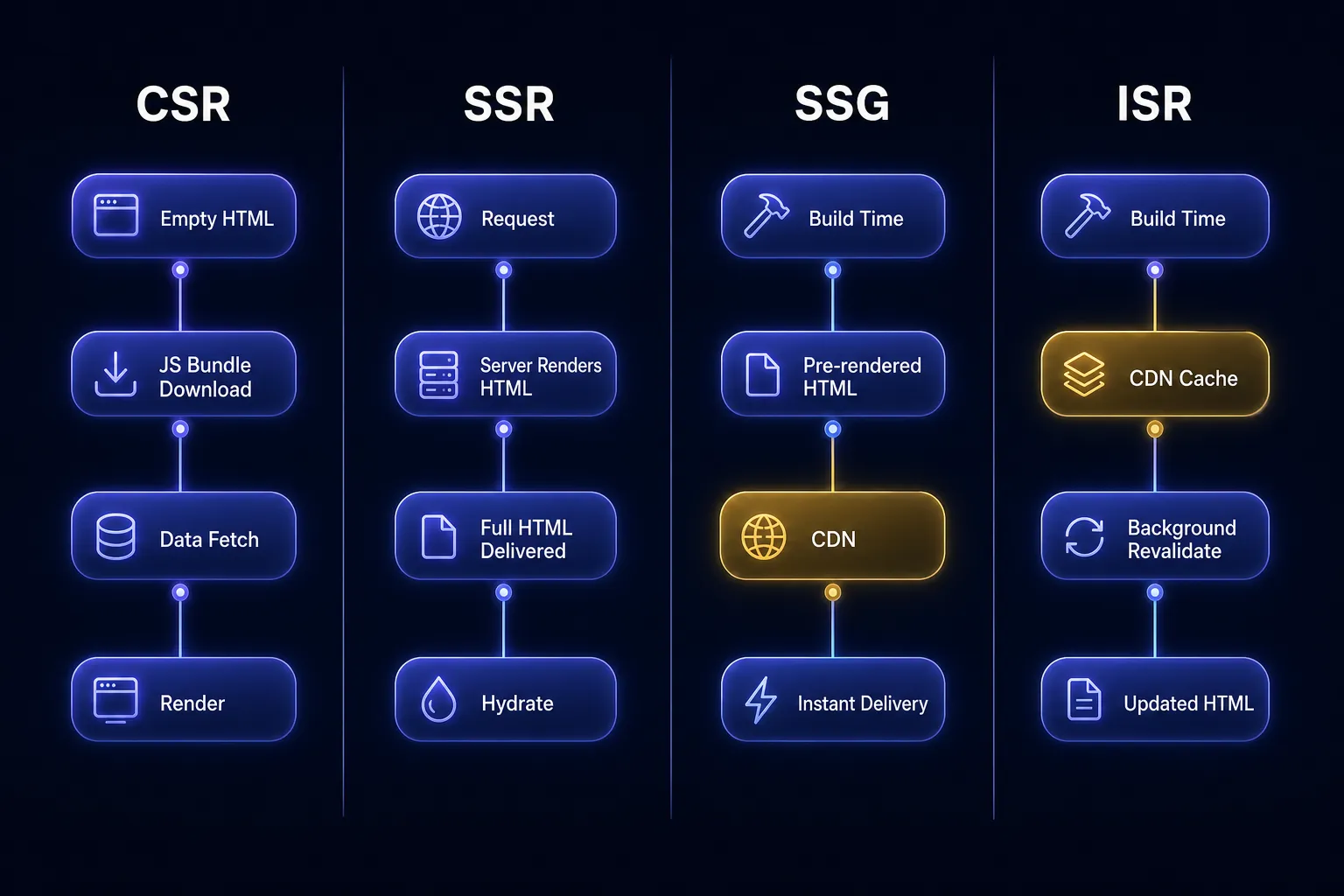
Client-Side Rendering (CSR)
The browser downloads JavaScript, executes it, fetches data, and renders the UI. The server’s only job is serving static files.
Best for: Authenticated dashboards where SEO doesn’t matter, highly interactive tools, apps behind a login wall.
Not for: Public-facing pages where SEO and initial load speed matter.
Server-Side Rendering (SSR)
On every request, the server runs the React components, fetches data, and sends fully-rendered HTML to the browser. The client receives a complete page immediately, then React “hydrates” it to add interactivity.
// app/products/[id]/page.tsx — SSR in the App Router
export default async function ProductPage({
  params,
}: {
  params: { id: string };
}) {
  // This runs on the server on every request
  const product = await fetch(
    `https://api.example.com/products/${params.id}`,
    { cache: 'no-store' } // Opt out of caching = SSR behavior
  ).then((res) => res.json());

  return (
    <article>
      <h1>{product.name}</h1>
      <p>{product.description}</p>
      <span>${product.price}</span>
    </article>
  );
}
Best for: Pages with frequently changing data (stock prices, live scores, personalized content).
Cost: Every request hits your server. Under high traffic, this adds latency and infrastructure cost.
Static Site Generation (SSG)
Next.js pre-renders pages at build time and serves the resulting static HTML files from a CDN. This is the fastest possible delivery — there is no server computation per request.
// app/blog/[slug]/page.tsx — SSG with dynamic routes
export async function generateStaticParams() {
  // Tell Next.js which paths to pre-render at build time
  const posts = await fetch('https://api.example.com/posts').then((res) =>
    res.json()
  );

  return posts.map((post: { slug: string }) => ({
    slug: post.slug,
  }));
}

export default async function BlogPost({
  params,
}: {
  params: { slug: string };
}) {
  const post = await fetch(
    `https://api.example.com/posts/${params.slug}`
  ).then((res) => res.json());

  return (
    <main>
      <h1>{post.title}</h1>
      <div dangerouslySetInnerHTML={{ __html: post.htmlContent }} />
    </main>
  );
}
Best for: Marketing pages, documentation, blog posts — content that changes infrequently.
Limitation: Content is stale until you rebuild and redeploy. If you publish a blog post, users won’t see it until the next build.
Incremental Static Regeneration (ISR)
ISR solves SSG’s staleness problem. Pages are statically generated, but Next.js automatically revalidates and regenerates them in the background after a specified interval — without a full rebuild.
// app/products/page.tsx — ISR: revalidate every 60 seconds
export const revalidate = 60; // seconds

export default async function ProductsPage() {
  const products = await fetch('https://api.example.com/products').then(
    (res) => res.json()
  );

  return (
    <ul>
      {products.map((product: { id: string; name: string }) => (
        <li key={product.id}>{product.name}</li>
      ))}
    </ul>
  );
}
With revalidate = 60, the page is served statically (fast!) but refreshes at most every 60 seconds in the background. Users always get a cached response; if the cache is stale, the next user after a background regeneration gets the fresh version.
Best for: E-commerce product listings, news homepages, dashboards with tolerable staleness.
File-Based Routing
One of Next.js’s most immediately appreciated features is its routing system. There is no router configuration file. The file system is the router.
app/
├── page.tsx             → /
├── about/
│   └── page.tsx         → /about
├── blog/
│   ├── page.tsx         → /blog
│   └── [slug]/
│       └── page.tsx     → /blog/:slug
├── products/
│   ├── page.tsx         → /products
│   └── [id]/
│       ├── page.tsx     → /products/:id
│       └── reviews/
│           └── page.tsx → /products/:id/reviews
└── api/
    └── webhook/
        └── route.ts     → POST /api/webhook
This convention eliminates an entire category of configuration. You look at the file system and immediately know the URL structure of the application. New developers can navigate the codebase without reading any router setup code.
Dynamic segments use bracket notation ([slug], [id]). Catch-all routes use [...segments]. Optional catch-alls use [[...segments]]. These conventions cover virtually every routing pattern without additional libraries.
Tip: The
route.tsconvention inside theappdirectory lets you define API endpoints as part of the same project. AGETandPOSTfunction exported fromapp/api/orders/route.tsautomatically handle the corresponding HTTP methods at/api/orders.
Layouts and Application Structure
In any multi-page application, some UI is shared across routes: navigation bars, sidebars, footers, authentication wrappers. In a plain React app with React Router, you manually wrap routes with shared components. In Next.js, this is handled declaratively through layouts.
A layout.tsx file wraps all pages within its directory and all subdirectories. Layouts are nested — just like the file system.
// app/layout.tsx — Root layout, wraps every page
export default function RootLayout({
  children,
}: {
  children: React.ReactNode;
}) {
  return (
    <html lang="en">
      <body>
        <GlobalNav />
        <main>{children}</main>
        <Footer />
      </body>
    </html>
  );
}
// app/dashboard/layout.tsx — Dashboard-specific sidebar
export default function DashboardLayout({
children,
}: {
children: React.ReactNode;
}) {
return (
<div className="dashboard-shell">
<DashboardSidebar />
<section className="dashboard-content">{children}</section>
</div>
);
}With this structure, /dashboard/settings is wrapped by both RootLayout (global nav, footer) and DashboardLayout (sidebar), without any explicit nesting in the page component itself. The layout tree mirrors the file tree.
Critically, layouts preserve state and don’t re-mount when navigating between pages within the same layout. The sidebar stays rendered and interactive across /dashboard/settings, /dashboard/billing, and /dashboard/team — React doesn’t destroy and recreate it on every navigation.
Server Components vs. Client Components
This is the most conceptually significant shift in the modern Next.js App Router, and it requires a mental model adjustment.
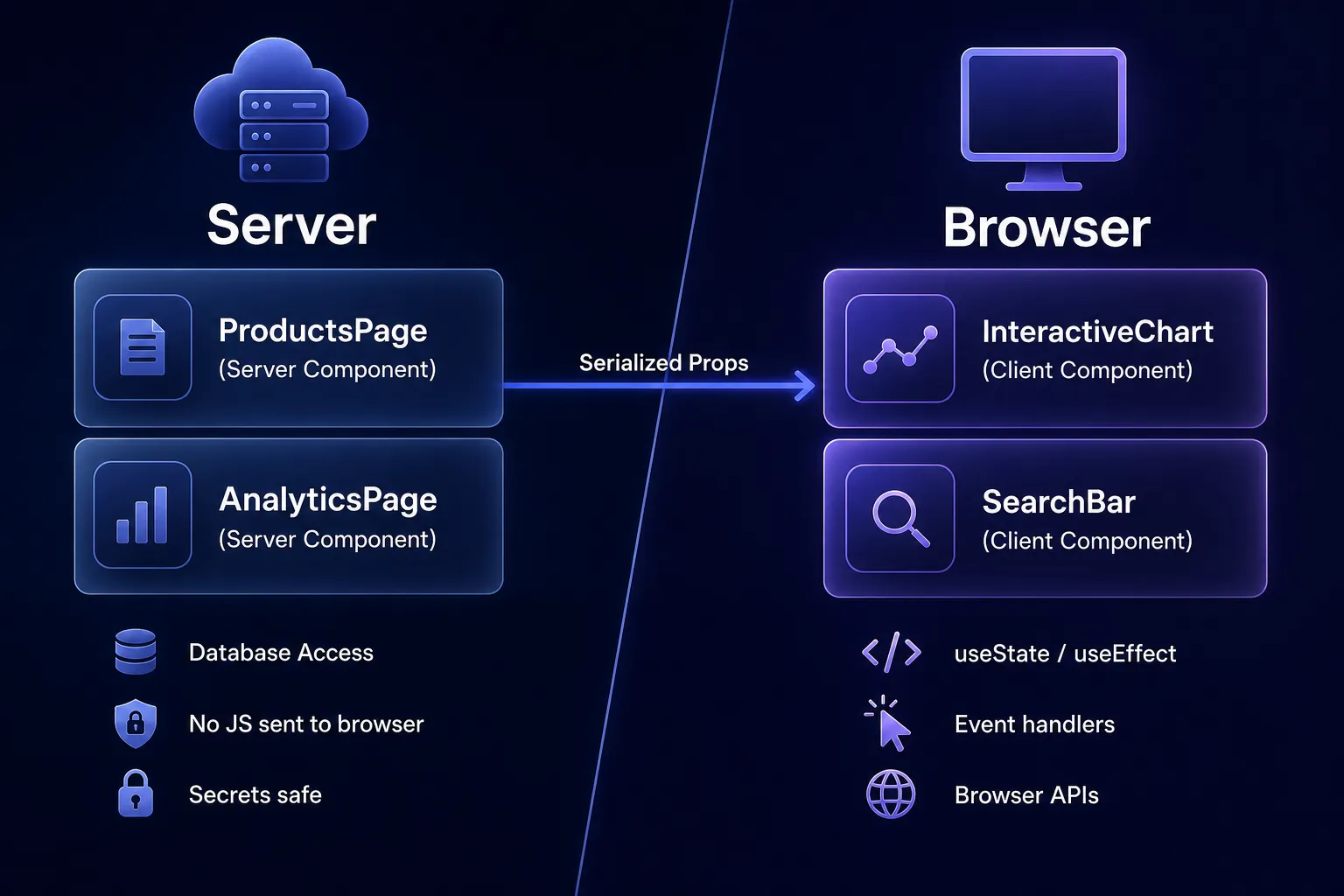
In the App Router, every component is a Server Component by default. Server Components run exclusively on the server. They can directly access databases, file systems, and secrets. They never ship their component code or dependencies to the browser. They cannot use useState, useEffect, or browser APIs.
Client Components are opted into explicitly with the 'use client' directive. They run on both the server (for initial HTML) and the browser (for interactivity).
// app/dashboard/analytics/page.tsx
// This is a Server Component — no 'use client' directive
import { db } from '@/lib/database';
import { InteractiveChart } from './InteractiveChart'; // Client Component

export default async function AnalyticsPage() {
  // Direct database access — this code NEVER reaches the browser
  const metrics = await db.query(
    `SELECT date, revenue FROM daily_metrics
     WHERE date >= NOW() - INTERVAL '30 days'
     ORDER BY date ASC`
  );

  return (
    <div>
      <h1>Last 30 Days</h1>
      {/* Pass serializable data to the Client Component */}
      <InteractiveChart data={metrics.rows} />
    </div>
  );
}
// app/dashboard/analytics/InteractiveChart.tsx
'use client'; // This component runs in the browser
import { useState } from 'react';
import { LineChart, Line, XAxis, YAxis, Tooltip } from 'recharts';
export function InteractiveChart({ data }: { data: MetricRow[] }) {
const [showRevenue, setShowRevenue] = useState(true);
return (
<div>
<button onClick={() => setShowRevenue(!showRevenue)}>
{showRevenue ? 'Hide' : 'Show'} Revenue
</button>
<LineChart width={600} height={300} data={data}>
<XAxis dataKey="date" />
<YAxis />
<Tooltip />
{showRevenue && <Line type="monotone" dataKey="revenue" stroke="#6366f1" />}
</LineChart>
</div>
);
}The critical insight here: the database query happens on the server. The 30 days of metrics are serialized and passed as props. Only the InteractiveChart component’s code — and its dependencies like Recharts — get sent to the browser. The database driver, your query logic, and any secrets used in authentication never leave your server.
Warning: Server Components cannot be imported inside Client Components. The dependency must flow one way: Server → Client. You can pass Server Components as children to Client Components using the
childrenprop pattern, which keeps the parent as a Server Component.
Data Fetching in Next.js
The traditional React data-fetching pattern — useEffect + useState — has several well-known problems:
// The classic React data fetching anti-pattern
function ProductList() {
  const [products, setProducts] = useState([]);
  const [loading, setLoading] = useState(true);
  const [error, setError] = useState(null);

  useEffect(() => {
    fetch('/api/products')
      .then((res) => res.json())
      .then((data) => {
        setProducts(data);
        setLoading(false);
      })
      .catch((err) => {
        setError(err);
        setLoading(false);
      });
  }, []);

  if (loading) return <Spinner />;
  if (error) return <ErrorMessage error={error} />;
  return <ul>{products.map(...)}</ul>;
}
Problems with this pattern:
- The component renders, shows a spinner, then fetches data. The user sees layout shift.
- Each component fetches independently, causing waterfall requests.
- All fetch logic ships to and runs in the browser, adding to bundle size.
- You can’t colocate server-only data access (like direct DB queries) in the component.
With Next.js Server Components and async/await, this collapses to:
// app/products/page.tsx — Clean, server-side data fetching
import { ProductCard } from '@/components/ProductCard';

async function getProducts() {
  const response = await fetch('https://api.example.com/products', {
    next: { revalidate: 300 }, // Cache for 5 minutes
  });

  if (!response.ok) {
    throw new Error('Failed to fetch products');
  }

  return response.json();
}

export default async function ProductsPage() {
  const products = await getProducts();

  return (
    <section>
      <h1>Our Products</h1>
      <div className="product-grid">
        {products.map((product) => (
          <ProductCard key={product.id} product={product} />
        ))}
      </div>
    </section>
  );
}
No useEffect. No loading state. No error state boilerplate (use Next.js error.tsx and loading.tsx conventions for those). The data is fetched before the HTML is sent to the client. The user sees a complete, content-filled page on first paint.
Performance Benefits: The Numbers That Matter
The performance gains from Next.js aren’t abstract. They translate into metrics that affect real business outcomes:
- LCP (Largest Contentful Paint): SSR and SSG pages commonly achieve LCP under 1s. CSR React apps regularly see 3–5s LCP on average hardware.
- FID / INP (Interactivity): Server Components reduce the JavaScript sent to the browser. Less JS = less parse/execute time = better interactivity scores.
- SEO indexing: Fully rendered HTML is indexed reliably and immediately by all search engines. Google’s Search Console shows consistent improvements when migrating from CSR to SSR/SSG.
- Automatic code splitting: Next.js splits your JavaScript bundle per route. A user visiting
/aboutonly downloads the code for that page, not the entire application. - Image optimization: The
<Image>component fromnext/imageautomatically serves WebP/AVIF formats, lazy-loads images, prevents layout shift by reserving dimensions, and resizes images for the requesting device.
import Image from 'next/image';

export function ProductHero({ product }) {
  return (
    <Image
      src={product.imageUrl}
      alt={product.name}
      width={800}
      height={600}
      priority // Preloads above-the-fold images
      placeholder="blur"
      blurDataURL={product.blurHash}
    />
  );
}
This single component replaces what would otherwise require a custom image pipeline, a CDN configuration, lazy-loading library, and layout-shift prevention CSS.
The Request Lifecycle in Next.js
flowchart TD
    A[Browser Request] --> B{Route type?}
    B -->|Static SSG/ISR| C[CDN Edge Cache]
    B -->|Dynamic SSR| D[Next.js Server]
    C --> E{Cache fresh?}
    E -->|Yes| F[Serve cached HTML]
    E -->|No - ISR| G[Regenerate in background]
    G --> F
    D --> H[Run Server Components]
    H --> I[Fetch Data]
    I --> J[Render HTML]
    J --> K[Stream to Browser]
    F --> L[Browser renders HTML]
    K --> L
    L --> M[React Hydration]
    M --> N[Interactive Page]
This diagram captures the key architectural difference: static routes bypass server computation entirely, hitting a CDN edge node geographically close to the user. Only dynamic routes hit the origin server — and even then, Next.js supports streaming, which means the browser starts receiving and rendering HTML before the server has finished generating the entire page.
When to Use Next.js
Use Next.js when:
- You’re building a marketing website or landing page where SEO and Core Web Vitals are business requirements.
- You’re building a SaaS product with both public (marketing) and authenticated (app) sections — Next.js handles both in one codebase with different rendering strategies per route.
- You’re building an e-commerce store where product pages need SEO, fast initial loads, and frequently updated inventory data (ISR is ideal here).
- You’re building a content-heavy application (news site, documentation, blog) where content updates frequently but doesn’t need real-time data.
- You’re on a team that will grow — Next.js conventions make large codebases navigable for new developers.
- You need backend API routes colocated with your frontend (Next.js route handlers eliminate the need for a separate Express server for simple cases).
When React Alone May Be Sufficient
Next.js is not always the right tool. Be honest about your requirements:
- Internal tools and admin dashboards used by authenticated employees with no SEO requirements and where a 1-2 second load is acceptable. Vite + React is simpler to set up and deploy.
- Learning projects where you want to understand React’s core model without framework abstractions hiding the mechanics.
- Embedded widgets that ship as a component inside an existing page — no need for a full framework.
- Teams deploying to locked-down environments (some enterprise on-prem setups) that cannot run a Node.js server. Pure static React is simpler to deploy to any CDN.
Note: The complexity cost of Next.js is real. Server Components introduce a mental model split that takes time to internalize. If your application genuinely doesn’t need SSR, SSG, or file-based routing, the added complexity is not free.
Trade-offs and Pitfalls
| Trade-off | Detail |
|---|---|
| Server requirement | SSR and Server Components require a Node.js server (or Vercel/serverless). Pure static hosting is only viable for fully SSG apps. |
| Hydration complexity | Mismatches between server-rendered HTML and client React tree cause hydration errors that can be difficult to debug. |
| Server Component learning curve | The 'use client' / server split requires a new mental model for React developers trained entirely on CSR. |
| Build time at scale | Large SSG sites with thousands of pages have long build times. ISR mitigates but doesn’t eliminate this. |
| Vendor alignment | Next.js is built by Vercel and deploys most easily on Vercel. Self-hosting on other platforms is supported but requires more configuration. |
| Cold starts | Serverless deployments of SSR routes can have cold start latency. This is partially mitigated by edge runtime options. |
Best Practices
- Default to Server Components. Start every component as a Server Component. Only add
'use client'when you needuseState,useEffect, browser APIs, or event handlers. This minimizes JavaScript sent to the browser. - Choose your rendering strategy deliberately per route. Don’t default everything to SSR because it’s familiar. Ask: does this page change on every request? Use SSR. Does it change occasionally? Use ISR. Does it never change until the next deployment? Use SSG.
- Colocate your data fetching with your components. Server Components make it safe to fetch data directly in the component that needs it. Don’t create artificial prop-drilling chains to centralize data fetching.
- Use
loading.tsxanderror.tsxconventions. Next.js wraps route segments in React Suspense boundaries automatically when you provide aloading.tsxfile. This gives you streaming without manual Suspense wiring. - Measure before optimizing rendering strategy. Don’t over-engineer. Start with the simplest approach (SSG or ISR) and move to SSR only when you can measure the need for real-time data.
- Use the
<Image>and<Link>components. They aren’t optional niceties — they implement critical optimizations (lazy loading, preloading, WebP conversion, prefetching) that would each require separate libraries in plain React.
The Future of React Development
Next.js’s influence has fundamentally changed how the React community thinks about building applications. React’s official documentation now recommends using a framework like Next.js for new projects. React Server Components — pioneered in Next.js — are being standardized into React itself, meaning other frameworks (Remix, Expo, etc.) are adopting the same model.
The direction is clear: React is becoming a full-stack rendering primitive, not just a browser UI library. The mental model of “components that run on the server” is not a Next.js-specific idea — it is the future of React development broadly.
For developers and teams building web applications today, Next.js represents the most mature, production-tested implementation of this model, with a vast ecosystem, strong community support, and clear upgrade paths as React itself evolves.
Conclusion
Next.js didn’t become the default React framework through marketing. It solved real, painful problems that React developers encountered every time they tried to ship a production application:
- CSR limitations → Multiple rendering strategies (SSR, SSG, ISR)
- SEO gaps → Server-rendered HTML on first load
- Routing boilerplate → File-based routing with zero configuration
- Bundle bloat → Server Components that never ship to the browser
- Data fetching complexity → Async Server Components with direct data access
- Shared UI complexity → Nested layouts with preserved state
The next step for you, as a reader, is concrete: take an existing React application or start a new one with npx create-next-app@latest, pick a single page, and implement it using a Server Component with direct data fetching instead of useEffect. The clarity of that pattern — compared to what you’re used to — will tell you everything you need to know about why Next.js won.
Further Reading
- Next.js Official Documentation — The App Router docs are thorough and include interactive examples.
- React Server Components RFC — The original RFC explaining the motivation and design behind Server Components.
- Web.dev Core Web Vitals — Understanding LCP, INP, and CLS is essential context for why Next.js’s performance defaults matter.
- Patterns.dev — Rendering Patterns — In-depth breakdowns of CSR, SSR, SSG, and streaming with visual diagrams.
- Vercel Blog — How Next.js 13 Works — Architectural deep-dive on the App Router from the team that builds it.